Why New Smartphone Cameras Feel Worse
Why New Smartphone Cameras Feel Worse
Summary
Marques Brownlee shoots the same scene with every iPhone from 1 to 17, and every Samsung Galaxy S from S1 to S23, and notices something surprising: the newest phone isn’t always the best-looking. He uses the side-by-sides to make a bigger argument about computational photography: smartphone cameras have basically maxed out the physics of a pocketable sensor, so manufacturers compete on edge cases — backlight, low light, fast motion — and they tune their pipelines to “never miss.” That tuning is what makes a Pixel 10 see your face and the blue sky in the same backlit frame. But it’s also what makes a Galaxy S23 photo of his face look haloed, glowy, and weirdly flattened compared to the older models.
The core insight is that the same multi-frame HDR, tone mapping, face detection, and exposure-adjustment tricks that rescue impossible scenes get applied to easy ones too. Brownlee describes it like one of Stuff Made Here’s self-correcting basketball hoops — no matter where you throw, the ball goes in. The camera refuses to spit out a bad photo, and as a side effect, regular daylight photos start to look subtly worse: over-processed, with haloing around windows and unnaturally lit faces. He points to viewer comments on his iPhone and Samsung comparison shorts as confirmation that he’s not the only one who prefers the older, simpler renderings.
He closes with the obvious-once-stated diagnosis — it’s a balancing act of “knowing when to turn it up and when to turn it down” — and recommends third-party apps like Halide and MotionCam that let you dial back or turn off the post-processing entirely. The whole video is a 7-minute argument that the next frontier in smartphone cameras isn’t more megapixels or bigger sensors; it’s restraint.
Highlights
”It doesn’t always look like the latest generation is the best”
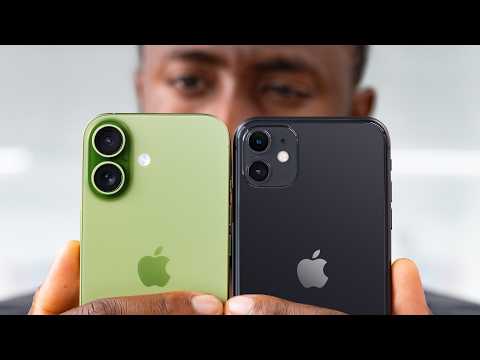
“I did this with a couple of different phones in a couple of different scenarios. And what ended up surprising me and quite a few other people is it doesn’t always look like the latest generation is always far and away the best.” — Marques Brownlee, 0:13
Clip command
yt-dlp --download-sections "*0:13-0:44" "https://www.youtube.com/watch?v=coX4duwUCpw" --force-keyframes-at-cuts --merge-output-format mp4 -o "cameras-not-always-best.mp4"”iPhone 17 vs iPhone 11 — can you tell?”
“This one was taken with the iPhone 17. And this one was taken with the iPhone 11. Now, of course if you pixel peep, there are some more nuanced small differences, like if you’re a photographer you probably already quickly noticed that the 17 has a larger sensor, that’s why the background’s a little bit more blurred, while the 11 has more in focus.” — Marques Brownlee, 1:31
Clip command
yt-dlp --download-sections "*1:31-2:08" "https://www.youtube.com/watch?v=coX4duwUCpw" --force-keyframes-at-cuts --merge-output-format mp4 -o "cameras-17-vs-11.mp4"”Self-correcting basketball hoop”
“It’s like one of those self-correcting basketball hoops that Stuff Made Here made, the YouTuber, where no matter where you throw the ball, it goes in the hoop. That is what a modern smartphone camera has turned into. No matter what you point the camera at, you’ll get a good picture. It refuses to spit out a bad one.” — Marques Brownlee, 3:20
Clip command
yt-dlp --download-sections "*3:20-3:42" "https://www.youtube.com/watch?v=coX4duwUCpw" --force-keyframes-at-cuts --merge-output-format mp4 -o "cameras-self-correcting-hoop.mp4"”I don’t like this photo anymore”
“Then keep going. S10, S20, S21, S22, all the way to today’s phone, the S23, and I… I don’t… I don’t like this photo anymore. Like, this is the exact over-processed look I’m talking about. Yes, you can see more than ever outside the window, the building and the sky outside, but there’s also this kind of a haloing around the window and the plant next to the window now.” — Marques Brownlee, 4:54
Clip command
yt-dlp --download-sections "*4:54-5:22" "https://www.youtube.com/watch?v=coX4duwUCpw" --force-keyframes-at-cuts --merge-output-format mp4 -o "cameras-dont-like-photo.mp4"”The snap into place”
“Really the easiest way to appreciate this: every modern smartphone camera has this gap between what you see in the viewfinder as you’re about to take the photo, and then once you take the photo, and then it processes, and then that new-looking photo. Some take longer than others to process, but you can always see it snap into place.” — Marques Brownlee, 6:16
Clip command
yt-dlp --download-sections "*6:16-6:43" "https://www.youtube.com/watch?v=coX4duwUCpw" --force-keyframes-at-cuts --merge-output-format mp4 -o "cameras-snap-into-place.mp4"Key Points
- The experiment (0:00) - Same photo shot on every iPhone 1 through 17, back to back
- Latest isn’t always best (0:13) - Surprising result: newest generation doesn’t always win
- The first iPhone camera (0:27) - Two-megapixel webcam pinhole, no autofocus, no video, no selfie camera
- Physics caps the sensor (0:59) - Phones stopped getting bigger in the 2010s; there’s no more room
- iPhone 17 vs iPhone 11 look similar (1:17) - Without pixel peeping, daylight photos are nearly indistinguishable
- Larger sensor = more blur (1:31) - The 17’s bigger sensor blurs backgrounds; the 11 keeps more in focus
- Edge cases are the new battleground (1:48) - Low light, fast subjects, deep zoom — where modern cameras differentiate
- Computational tricks (2:44) - Multi-frame HDR, tone mapping, exposure adjustment, face detection
- Nexus 4 reference shot (3:11) - What a backlit scene looks like before smart HDR
- The self-correcting hoop analogy (3:20) - Modern cameras refuse to take a bad photo
- Over-processing hits easy shots too (3:42) - The pursuit of never-miss makes daylight photos slightly worse
- The Galaxy S progression (4:24) - Same photo, S1 through S23; skipped S10 to S20 to match the year
- Multi-frame HDR debut (4:40) - The Galaxy S9 was the inflection point that preserves the blue sky
- The over-processed look defined (5:08) - Haloing around windows, unnaturally lit faces
- Viewers agree (5:49) - Comments on his shorts confirm a preference for older, simpler renderings
- The balancing act (5:57) - Knowing when to turn computational tricks up vs. down
- The viewfinder-to-photo snap (6:16) - Watch the post-processing kick in after the shutter
- Tuning still needed (6:43) - If iPhone 11 beats iPhone 17 on color, there’s work to do
- Third-party apps (6:57) - Halide, MotionCam let you dial back or kill post-processing
Mentions
Companies
- Apple (0:00) - Every iPhone 1-17 used in the comparison
- Samsung (4:24) - Every Galaxy S1-S23 used in the comparison
- Google (2:44) - Pixel 10 used as backlight HDR example; Nexus 4 as the pre-HDR baseline
- Stuff Made Here (3:20) - YouTuber referenced for the self-correcting basketball hoop analogy
Products & Technologies
- iPhone 1 through iPhone 17 (0:00) - Full lineup tested in the comparison
- Galaxy S1 through Galaxy S23 (4:24) - Full lineup tested; S10 and S20 numbering matches calendar year
- Galaxy S8 (4:40) - Where windows still blow out, no smart HDR
- Galaxy S9 (4:40) - Introduction of multi-frame HDR
- Galaxy S23 (4:54) - The “I don’t like this photo anymore” example
- Galaxy S26 (6:43) - Cited as worse-looking than the S23 in some ways
- Pixel 10 (2:44) - Backlit demo: face, hoodie, and blue sky all preserved
- Nexus 4 (3:11) - Pre-smart-HDR baseline for the same scene
- Halide (6:57) - Recommended app for reducing post-processing
- MotionCam (6:57) - Recommended app for reducing post-processing
- Multi-frame HDR (2:44) - Core computational photography technique
- Tone mapping (2:44) - Brightness compression across the dynamic range
- Face detection (2:44) - Pipeline step that boosts faces specifically
Surprising Quotes
“The first iPhone camera was almost an afterthought. It was this little pinhole two-megapixel webcam-type of thing, no autofocus, no video recording, didn’t even have a selfie camera.” — Marques Brownlee, 0:27
“But you can specifically see around the Galaxy S8 when the window behind me is blown out, but then with the introduction of multi-frame HDR with the S9, suddenly you can see the blue sky and everything else is preserved.” — Marques Brownlee, 4:40
“Yes, you can see more details than ever in my face, but my face is not actually that light.” — Marques Brownlee, 5:22
“If the iPhone 11 has more natural color than the iPhone 17, and the Galaxy S23 looks better in a lot of ways than the S26, then we know that some more tuning is definitely still needed.” — Marques Brownlee, 6:43
Transcript
Marques Brownlee: 0:00 All right, so I decided to try something. I broke out every single iPhone generation from one to 17 and took the same picture with every single one of them, back to back. And the results were super interesting.
Marques Brownlee: 0:13 I did this with a couple of different phones in a couple of different scenarios. And what ended up surprising me and quite a few other people is it doesn’t always look like the latest generation is always far and away the best. And I’ll tell you why.
Marques Brownlee: 0:27 See for years, smartphone cameras have been focused on getting better and better for regular photos, right? Because they were bad, of course, when they first started. The first iPhone camera was almost an afterthought. It was this little pinhole two-megapixel webcam-type of thing, no autofocus, no video recording, didn’t even have a selfie camera.
Marques Brownlee: 0:44 But as people and culture valued the ability to take quick high-quality pictures and videos more and more, of course you see the cameras improving drastically on the back of our phones year over year. It would be a legitimate selling point that a camera on a new generation of phone is way better than the year before.
Marques Brownlee: 0:59 And so this continued as phones got bigger and better and cameras got a bit bigger and better until right around the 2010s. Phones did eventually stop getting way bigger, and camera bumps of course still grew, but now at this point we’re basically maxing out how much phone you can carry in your pocket. Like there’s basically no more room left in here. It’s physics.
Marques Brownlee: 1:17 So the dramatic improvements were getting less dramatic. See these two photos? Pretty similar, right? Without zooming in and pixel peeping, they almost look like they could be taken with the same phone, just with a little contrast curve, saturation bump a little bit.
Marques Brownlee: 1:31 This one was taken with the iPhone 17. And this one was taken with the iPhone 11. Now, of course if you pixel peep, there are some more nuanced small differences, like if you’re a photographer you probably already quickly noticed that the 17 has a larger sensor, that’s why the background’s a little bit more blurred, while the 11 has more in focus.
Marques Brownlee: 1:48 But generally for most people, they both look fine and basically any phone from the past five years can take a perfectly usable photo in broad daylight, perfect ideal conditions like this. So now what they’re more focused on is getting better around the edges, like the more difficult shooting scenarios.
Marques Brownlee: 2:08 Low light, super fast-moving subjects, deep zoom, like these edge cases are where you can still see a bigger difference between a good and bad smartphone camera. So, you can start to see where this is going, right? Basically any phone these days can take a good enough quality photo in good lighting conditions, no matter the price. That doesn’t separate them anymore.
Marques Brownlee: 2:26 So the real separation between a good and a bad smartphone camera comes when the user throws the absolute worst possible conditions at it. So something like this photo right here. Right? This to an untrained eye, this might look like a pretty normal photo, which it should.
Marques Brownlee: 2:44 But if there’s a photographer in the room watching this video over your shoulder, they’ve probably already pointed out that this scene is literally entirely backlit. And that smartphone, which happens to be a Pixel 10, is doing a ton of clever computational photography, multi-frame HDR, tone mapping, and…
Marques Brownlee: 3:00 Exposure adjustment, face detection, it’s making sure somehow you can see my face and the black hoodie that I’m wearing and the blue sky behind me in one shot, which is actually insane.
Marques Brownlee: 3:11 For some perspective, here’s the same shot with a Nexus 4, which was before the days of smart HDR coming along. So that’s how terrible the scene is supposed to look.
Marques Brownlee: 3:20 It’s like one of those self-correcting basketball hoops that Stuff Made Here made, the YouTuber, where no matter where you throw the ball, it goes in the hoop.
Marques Brownlee: 3:27 That is what a modern smartphone camera has turned into. No matter what you point the camera at, you’ll get a good picture. It refuses to spit out a bad one.
Marques Brownlee: 3:34 To the point where you think there’s no way your skills could be that bad because you never miss.
Marques Brownlee: 3:42 But this is where it’s started to get weird. I think that in pursuit of this perfect photo-taking machine where you can’t miss no matter how insane the situation is, it’s actually started to make regular daylight photos slightly worse.
Marques Brownlee: 3:58 Like you’ve probably noticed the over-processed look before. You’ve probably seen it here and there. Some brands are more guilty of it than others. It’s a little bit hard to articulate what it is.
Marques Brownlee: 4:08 But I think in general, the more likely a brand or a phone camera is to throw every trick in the book to try to save a photo, the more likely they are to throw all of those same tricks at a regular photo that doesn’t really need it. It kind of messes it up a little bit.
Marques Brownlee: 4:24 See here, this is the progression of every Samsung Galaxy S ever taking the same photo, from S1 to S2, S3, S4, S5, all the way to today. And yes, they did skip S10 to S20 to line up with the year.
Marques Brownlee: 4:40 But you can specifically see around the Galaxy S8 when the window behind me is blown out, but then with the introduction of multi-frame HDR with the S9, suddenly you can see the blue sky and everything else is preserved.
Marques Brownlee: 4:54 Then keep going. S10, S20, S21, S22, all the way to today’s phone, the S23, and I… I don’t… I don’t like this photo anymore.
Marques Brownlee: 5:08 Like, this is the exact over-processed look I’m talking about. Yes, you can see more than ever outside the window, the building and the sky outside, but there’s also this kind of a haloing around the window and the plant next to the window now.
Marques Brownlee: 5:22 And yes, you can see more details than ever in my face, but my face is not actually that light.
Marques Brownlee: 5:27 So spin back to the Galaxy S23 and I don’t think I’m the only one who prefers this older and maybe slightly worse photo because it just looks a little more natural.
Marques Brownlee: 5:39 There’s a little less shadow detail and a little less HDR, but there’s also less haloing and less unnatural glowing and flattening and it just overall looks better.
Marques Brownlee: 5:49 And I’m not the only one who thinks this. Look at the comments on the short that I published with all these photos in them. A lot of other people feel that way too.
Marques Brownlee: 5:57 So this is now the balancing act of tuning one of these cameras. I think a lot of these companies they already know, you know, they pull a lot of these tricks, the tone mapping, the multi-frame HDR, the face detection, the exposure adjustments.
Marques Brownlee: 6:00 And they know that that stuff in excess can look kind of weird on a regular photo. So it’s all about knowing when to turn it up and when to turn it down. If you need all of that stuff to save a bad situation, then turn it up. But if you don’t need it, turn it down.
Marques Brownlee: 6:16 Really the easiest way to appreciate this: every modern smartphone camera has this gap between what you see in the viewfinder as you’re about to take the photo, and then once you take the photo, and then it processes, and then that new-looking photo.
Marques Brownlee: 6:30 Some take longer than others to process, but you can always see it snap into place. And the more difficult the shooting scenario, the more dramatic that snap. That is the post-processing that we’re talking about here.
Marques Brownlee: 6:43 So look, if the iPhone 11 has more natural color than the iPhone 17, and the Galaxy S23 looks better in a lot of ways than the S26, then we know that some more tuning is definitely still needed.
Marques Brownlee: 6:57 There are some really good apps on these phones that will let you turn down the post-processing or even try to turn it completely off. I’ll link some good ones below. Sometimes it works, sometimes it’s a little bit more difficult, but you can try it if you want.
Marques Brownlee: 7:13 Also, I’ll link all the shorts down below where you can watch all the generations of every smartphone through every single photo. Those are fun too. Thanks for watching. Catch you in the next one. Peace.