Antigravity A1: A New Take on Drones!
Antigravity A1: A New Take on Drones!
Summary
Marques Brownlee showcases the Antigravity A1, a sponsored look at a drone that flips the usual formula: instead of a camera gimbal you have to aim while flying, the A1 is essentially a 360 camera that happens to be able to fly. Two lenses — top and bottom, the same sensors and lenses as the Insta360 X3 — capture everything around the drone all the time in 8K/30, and stitching makes the drone body and propellers completely invisible in the final footage. The pitch is that you stop worrying about nailing the shot in the air; you just fly creatively near your subject and do all the framing in post when you get home. Features like Sky Genie (automatic subject orbiting) and Deep Track (car tracking without keyframing) push the tool angle further, and the 249-gram weight keeps it regulatory compliant almost everywhere.
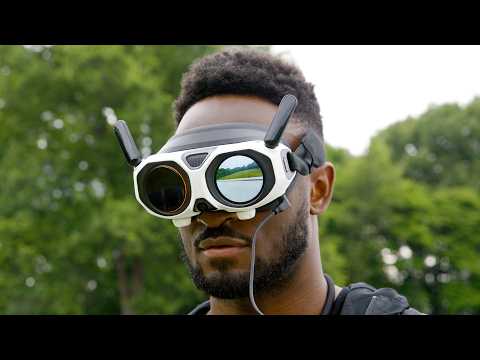
The bigger surprise for Marques is the fun factor. The A1 pairs with FPV goggles that use OmniLink transmission, so you can fly in one direction while freely looking around in any other — “kind of like you’re a bird flying through the park.” The goggles have a 90-degree field of view (the widest of any flying FPV goggles), 2560x2560 per eye, one-tap defogging, passthrough, and a customizable exterior screen so bystanders can see what you’re seeing. Instead of a two-stick controller there’s a single joystick: since you’re not doing camera moves while flying, you just point the drone and pull the trigger, and it feels closer to flying a plane. Studio producer Andrew went from his first shot in normal flight mode at 10 AM to dynamic sport-mode FPV shots by early afternoon the same day, and Skypath lets a total novice put on the goggles and re-fly a recorded path in real time while looking around in 360.
Even though it’s sponsored, Marques asked to include honest feedback: the stitching leaves an ever-so-slight smudge on the horizon line that can sneak into shots, the light-up goggles will get you funny looks in public, and the headset needs a top strap to distribute its weight. Antigravity is also working on goggles-less flight with a ring remote and gesture controls. Battery is 24 minutes standard (39 with the extended version), there’s 20 GB of internal storage as a fallback, the lenses are replaceable, and Antigravity Care covers flyaways and water damage. His verdict: this is not a review, but it’s one of the most interesting hardware products he’s seen in a while.
Highlights
”A 360 camera that happens to be able to fly”
“So, A1 doesn’t have a normal camera gimbal like you might expect from a drone. Instead, it has these two lenses, one at the top, one at the bottom. And that’s because instead of having to control a singular camera while flying, the Anti-Gravity A1 is essentially a 360 camera that’s capturing all angles all the time that happens to be able to fly.” — Marques Brownlee, 0:54
Clip command
yt-dlp --download-sections "*0:54-1:31" "https://www.youtube.com/watch?v=ZpF6IE0rdxA" --force-keyframes-at-cuts --merge-output-format mp4 -o "a1-360-camera-that-flies.mp4"”It makes the drone itself and the propellers completely invisible”
“And then just like the 360 cameras have that like invisible selfie stick feature, these sensors and lenses are actually the same as the Insta360 X3. So through stitching, it makes the drone itself and the propellers completely invisible in your final footage.” — Marques Brownlee, 2:00
Clip command
yt-dlp --download-sections "*2:00-2:37" "https://www.youtube.com/watch?v=ZpF6IE0rdxA" --force-keyframes-at-cuts --merge-output-format mp4 -o "a1-invisible-drone-stitching.mp4"”Kind of like you’re a bird flying through the park”
“You get a feed straight from the A1 to these FPV goggles that you wear, and then it’s not like a normal FPV drone where you’re always only looking forward as you fly. With the OmniLink transmission, you can fly in one direction, but freely move your head around and look around wherever you want to experience everything around you.” — Marques Brownlee, 4:46
“It’s kind of like you’re a bird flying through the park and looking around, or like a mini jet or something. It’s just incredibly immersive.” — Marques Brownlee, 5:04
Clip command
yt-dlp --download-sections "*4:46-5:24" "https://www.youtube.com/watch?v=ZpF6IE0rdxA" --force-keyframes-at-cuts --merge-output-format mp4 -o "a1-bird-flying-goggles.mp4"”The joystick makes sense for this drone”
“And by the way, you’ve probably noticed I’m not using a typical two-stick controller. This is a joystick. And this is another one of those things that at first I was a little skeptical of because there’s a reason everyone uses those two sticks.” — Marques Brownlee, 5:40
“Because again, you don’t have to do the camera moves as you’re flying. You’re just positioning the camera in space. So it feels closer to just flying a plane and getting into the spot you want and then you’re moving your head around freely to look around.” — Marques Brownlee, 6:00
Clip command
yt-dlp --download-sections "*5:40-6:22" "https://www.youtube.com/watch?v=ZpF6IE0rdxA" --force-keyframes-at-cuts --merge-output-format mp4 -o "a1-joystick-controls.mp4"Skypath: record a flight, hand someone the goggles
“So basically, I fly a path that I think is really neat and record it and then I give someone else the goggles, they put the goggles on and the drone will fly the same path in real time and then they can look around with the goggles in 360 and experience it live, which I think really fun. They don’t need any experience to see that.” — Marques Brownlee, 7:21
Clip command
yt-dlp --download-sections "*7:21-7:57" "https://www.youtube.com/watch?v=ZpF6IE0rdxA" --force-keyframes-at-cuts --merge-output-format mp4 -o "a1-skypath-shared-flight.mp4"The honest feedback: a smudge on the horizon
“Now look, I know this is a sponsored video, but I also asked them if I could throw in a couple small things I noticed because I think people are going to be thinking about buying this after watching this video, and it’s not perfect.” — Marques Brownlee, 7:57
“So first off, the stitching to hide the drone is impressive, but to the trained eye, there is this ever so slight smudge on the horizon of your footage.” — Marques Brownlee, 8:08
Clip command
yt-dlp --download-sections "*7:57-8:44" "https://www.youtube.com/watch?v=ZpF6IE0rdxA" --force-keyframes-at-cuts --merge-output-format mp4 -o "a1-honest-feedback-stitching.mp4"Key Points
- A different kind of drone (0:10) - The Antigravity A1 looks and works differently from every popular drone Marques has tried
- Not just a tool, but fun (0:29) - After using it, it’s “just a straight-up like fun experience” beyond being an aerial-footage tool
- No gimbal, two lenses (0:54) - One lens on top, one on the bottom; it’s a 360 camera capturing all angles all the time that can fly
- Frame in post, not in flight (1:46) - As long as the subject is nearby, you focus on creative flying and do all the framing later at home
- Insta360 X3 sensors and invisible stitching (2:00) - Same sensors/lenses as the Insta360 X3; stitching hides the drone and propellers entirely
- Sky Genie and Deep Track (2:18) - Auto-orbit a selected subject, and track a car at matched speed without any keyframing
- 8K 30 FPS 360 recording (3:00) - “The correct frame rate”; plenty of flexibility for reframing, though no 8K screenshots
- 249 grams, regulatory sweet spot (3:17) - Compliant almost everywhere, with obstacle avoidance, auto-landing gear, payload detection, and auto-return to home
- Replaceable lenses and Antigravity Care (3:38) - Lens swaps beat gimbal repairs; Care covers flyaways and water damage
- 24-minute battery, 39-minute extended (4:04) - Par for the course, but battery anxiety drops since framing happens after the fact
- 20 GB internal storage (4:21) - Covered if you forget an SD card; Marques thinks every camera should have internal storage
- OmniLink FPV goggles (4:46) - Fly one direction while freely looking around in any other, unlike normal forward-only FPV
- Goggle specs and exterior screen (5:11) - 90-degree FOV, 2560x2560 per eye, one-tap defogging, passthrough, plus an outside screen showing others your view
- Joystick instead of two sticks (5:40) - Point the drone, pull the trigger; a picture-in-picture window shows the flight path when you look away (6:22)
- Andrew’s one-day learning curve (6:27) - First normal-mode shot at 10 AM, dynamic sport-mode FPV shots by early afternoon the same day
- Skypath for non-pilots (7:21) - Record a flight, then someone else re-experiences it live in 360; have first-timers sit down (7:46)
- Honest critiques in a sponsored video (7:57) - Horizon stitching smudge, goggles look odd in public, and the headset needs a top strap (9:01)
- Goggles-less flight coming (8:44) - A ring remote with gesture controls is in the works, not yet seen in action
- “One of the most interesting hardware products I’ve seen in a while” (9:00) - Not a review, but a strong endorsement of the concept
Mentions
Companies
- Antigravity (0:00) - Maker of the A1 and the video’s sponsor
- Insta360 (2:00) - The A1 uses the same sensors and lenses as the Insta360 X3
Products & Technologies
- Antigravity A1 (0:10) - The 360-camera drone at the center of the video
- Insta360 X3 (2:00) - Donor of the A1’s 360 sensors and lenses
- Sky Genie (2:18) - Automatically orbits a subject selected in the goggles
- Deep Track (2:18) - Frames a moving car without keyframing; Marques’s favorite feature for car shoots
- OmniLink transmission (4:46) - Lets you look freely around in the goggles independent of flight direction
- FPV goggles (5:11) - 90-degree FOV, 2560x2560 per eye, defogging, passthrough, exterior screen
- Skypath (7:21) - Records a flight path and replays it live for another goggle wearer
- Antigravity Care (3:38) - Coverage plan for flyaways, water damage, and accidents
- Ring remote with gesture controls (8:44) - In-development goggles-less flight option
People
- Andrew (6:27) - MKBHD studio member who went from first flight to sport-mode FPV shots in a single day
Surprising Quotes
“But this A1, this is a little different from any of the other popular drones that I’ve seen or tried, and it’s the reason I want to showcase it because after using it, it’s not just a tool to get aerial footage, but it’s also just fun.” — Marques Brownlee, 0:29
“The A1 is 249 grams, which if you’ve been into drones long enough before, you’ve heard that number and that’s exactly where it has to be to be regulatory compliant almost everywhere.” — Marques Brownlee, 3:17
“I really now think anyone who’s never used anything like this can pick this up and learn the controls and be super confident like I was within like an hour.” — Marques Brownlee, 6:47
“I will say pro tip: the first time you have someone try this, uh, have them do it sitting down, just because they’re gonna look down and they’re gonna see themselves hundreds of feet off the ground and just, just to be safe.” — Marques Brownlee, 7:46
“This is not a review, but I’m sure there will be a bunch of other really good video reviews around the same time this drops, so I’ll link those below when I see them. This is one of the most interesting hardware products I’ve seen in a while.” — Marques Brownlee, 9:00
Transcript
Marques Brownlee: 0:00 This video is sponsored by Anti-Gravity.
Marques Brownlee: 0:10 So this here is called the Anti-Gravity A1. It is a drone, but it looks a bit different than what we’ve come to expect from drones. Now, I’ll be the first to admit, while I’ve made two or three drone videos in the past, I’m not an expert. To me, drones are really, really good tools. And so they’re very expensive, but they’re really useful for someone who has a specific type of shot, a type of footage that they’re trying to get.
Marques Brownlee: 0:29 But this A1, this is a little different from any of the other popular drones that I’ve seen or tried, and it’s the reason I want to showcase it because after using it, it’s not just a tool to get aerial footage, but it’s also just fun. Like, it’s just a straight-up like fun experience to just go out and fly it. So this is a genuinely new, interesting take on something that was already pretty awesome. So I was intrigued. Also a reminder, they’re sponsoring this video, so I’ll be going over my experience and even some feedback for them by the end too.
Marques Brownlee: 0:54 So, A1 doesn’t have a normal camera gimbal like you might expect from a drone. Instead, it has these two lenses, one at the top, one at the bottom. And that’s because instead of having to control a singular camera while flying, the Anti-Gravity A1 is essentially a 360 camera that’s capturing all angles all the time that happens to be able to fly.
Marques Brownlee: 1:13 We’ve had 360 cameras, stuff like this, for years. And the whole point of these is they’re super versatile. So they’re always recording everything around them in 360 all the time, and all you have to do is just kind of get the camera into position and then you don’t have to worry about framing. You just kind of do your thing, live that experience, and then later you can go back and frame it exactly how you want.
Marques Brownlee: 1:31 So when these started getting really good, that’s when people started getting really tricky with them, doing stuff like spinning them around on a string or throwing them or putting them up on these huge selfie sticks. So now the big unlock is it can fly. So because of all that, you can now just grab this A1, grab these goggles and this joystick, which I’ll talk about in a minute, and just start flying. And as long as the subject you want to capture is generally nearby, you just worry about getting creative with the flying and then you can do all the framing in post when you get home.
Marques Brownlee: 2:00 And then just like the 360 cameras have that like invisible selfie stick feature, these sensors and lenses are actually the same as the Insta360 X3. So through stitching, it makes the drone itself and the propellers completely invisible in your final footage.
Marques Brownlee: 2:18 And then they’ve got a bunch of other great features like Sky Genie that can automatically orbit a subject that you select in your goggles, and my favorite, Deep Track, since I think really drones and car shoots go hand in hand. Basically, you can fly in a straight line and then all you have to do is try and match the speed of the car as best you can and Deep Track will pick up the car and frame your subject without having to do any keyframing.
Marques Brownlee: 2:37 And then since it’s a 360 camera, there’s also some more creative ways to use the video you’re capturing that work better on social media platforms, like these floating orb shots, which would you find a ton of use for this? No, probably not, but it’s still a cool idea to see some weird perspectives like this. So as a tool for a video creator, it already feels like a game changer that you don’t have to get the exact shot perfect in the moment.
Marques Brownlee: 3:00 moment, you can just focus on getting creative with the positioning. That is pretty sweet. Uh, the orb of recording 360 is 8K at 30 FPS, the correct frame rate. And so you can’t take like an 8K screenshot, but you can get pretty creative and have a good amount of flexibility with where you want to frame stuff up.
Marques Brownlee: 3:17 The A1 is 249 grams, which if you’ve been into drones long enough before, you’ve heard that number and that’s exactly where it has to be to be regulatory compliant almost everywhere. And it has obstacle avoidance, it has navigation assistance, auto-landing gear, payload detection, and auto-return to home, which I’ve used quite a few times because you might get a little overconfident in how far away you can fly.
Marques Brownlee: 3:38 The lenses are replaceable, so if you do get in an accident, that’s much easier to fix than a whole gimbal. Uh, and there’s also anti-gravity care, so it’ll cover things like flyaways or water damage or anything else like that.
Marques Brownlee: 3:49 Now, the weak spot for almost all drones in my opinion has been battery, you know, you you get up there, you try to frame out and get like the perfect shot and then 15 minutes later you’re landing it because you didn’t quite get it but you’re gonna get it on the next battery. The A1 comes with a 24 minute battery standard, uh, which is about par for the course, but that’s on top of the fact that you don’t feel as much pressure to nail the exact right camera shot in the air because you’re framing it after the fact. So the battery anxiety definitely feels like it’s less. But if you’re still worried it also has a 39 minute extended version.
Marques Brownlee: 4:21 Oh and there’s 20 gigs of internal storage too. So the SD card slot is easily accessible, but if you ever forget a card, you’re still covered. I am definitely in the camp that every camera should have internal storage.
Marques Brownlee: 4:33 But anyway, back to the main point. It’s just fun. This is the original reason why I was so into this drone, which is because the fun factor is so high. You could even honestly just go out and fly it around for fun, not even trying to get any specific shot. Just having fun with it.
Marques Brownlee: 4:46 You get a feed straight from the A1 to these FPV goggles that you wear, and then it’s not like a normal FPV drone where you’re always only looking forward as you fly. With the OmniLink transmission, you can fly in one direction, but freely move your head around and look around wherever you want to experience everything around you. It’s kind of like you’re a bird flying through the park and looking around, or like a mini jet or something. It’s just incredibly immersive.
Marques Brownlee: 5:11 The goggles have a 90-degree field of view, which is the widest of any flying FPV goggles, 2560 by 2560 per eye, one-tap defogging, and a passthrough feature just in case someone comes up to you while you’re flying. But what’s really neat, and I haven’t seen this before, is it has this customizable exterior screen so that others can see what you’re looking at on the outside of the goggles. So if you’re with someone, they can kind of get a sense of what you’re seeing while you’re flying. I also like that you can use it as a status screen for firmware updates too.
Marques Brownlee: 5:40 And by the way, you’ve probably noticed I’m not using a typical two-stick controller. This is a joystick. And this is another one of those things that at first I was a little skeptical of because there’s a reason everyone uses those two sticks. It’s just the muscle memory is baked in already, I already know exactly how to get that smooth sliding parallax shot we’ve all seen. But the joystick makes sense for this drone
Marques Brownlee: 6:00 Because again, you don’t have to do the camera moves as you’re flying. You’re just positioning the camera in space. So it feels closer to just flying a plane and getting into the spot you want and then you’re moving your head around freely to look around. So I’m in on this joystick. There’s an icon on the screen that shows where the front of the drone is pointed. And then all you do is just press the trigger and you’re flying in that direction. And if you look away from the flight path, you get this little picture-in-picture window so you can still see what’s in front of the drone.
Marques Brownlee: 6:27 So it ends up feeling super intuitive. I gave this to Andrew at the studio for a day. This is his first shot he took with the A1 in normal flight mode at like 10:00 in the morning. And so then here’s the last shot he got by early afternoon the same day using sport mode and the FPV controls which let you turn your wrist for tighter turns. And it’s way more dynamic. It’s pretty fire.
Marques Brownlee: 6:47 I really now think anyone who’s never used anything like this can pick this up and learn the controls and be super confident like I was within like an hour. I was like, I have a screenshot here of my first time trying FPV mode ever and look how quick I tried some stuff.
Marques Brownlee: 7:13 No problem, no worries. Uh, so what about someone who’s not as technically savvy, but still wants to have some fun with a drone like this? Then it has those extra features.
Marques Brownlee: 7:21 So one called Skypath, I think is really cool. So basically, I fly a path that I think is really neat and record it and then I give someone else the goggles, they put the goggles on and the drone will fly the same path in real time and then they can look around with the goggles in 360 and experience it live, which I think really fun. They don’t need any experience to see that.
Marques Brownlee: 7:46 And it’s pretty trippy, just floating around. I will say pro tip: the first time you have someone try this, uh, have them do it sitting down, just because they’re gonna look down and they’re gonna see themselves hundreds of feet off the ground and just, just to be safe.
Marques Brownlee: 7:57 Now look, I know this is a sponsored video, but I also asked them if I could throw in a couple small things I noticed because I think people are going to be thinking about buying this after watching this video, and it’s not perfect. So first off, the stitching to hide the drone is impressive, but to the trained eye, there is this ever so slight smudge on the horizon of your footage. And that’s basically where it’s stitching together the two lenses. And for the most part, you don’t really ever notice it, but there is a chance it can get in your shot if you’re doing a lot of recording of things like right on the horizon line. So that’s something to keep in mind.
Marques Brownlee: 8:32 And the number two, if you’re, if you’re, if you’re gonna shoot in a public area, uh, because you have the goggles on and the screen is lighting up, just be ready to explain that to people because they can look kind of crazy. Uh, I was told they’re also in the process of working on some goggles-less flights with a ring remote and gesture controls, which sounds pretty awesome. I haven’t seen that in action yet, but I appreciate that they’re still trying to find more ways to let people get creative with this drone.
Marques Brownlee: 9:00 would let you fly for multiple batteries without getting uncomfortable. But other than that, yeah, I’ve had a really good time just messing with, having fun with the Antigravity A1. This is not a review, but I’m sure there will be a bunch of other really good video reviews around the same time this drops, so I’ll link those below when I see them. This is one of the most interesting hardware products I’ve seen in a while.
Marques Brownlee: 9:01 But speaking to these goggles, I do wish they had an extra strap, like up at the top. It’s kind of similar to any other like heavy thing. There’s obviously displays up here, so if you have an extra strap at the top, it distributes the weight more evenly, it’s more comfortable.
Marques Brownlee: 9:20 Antigravity’s biggest sale of the year is here, so you can save up to 25% off Antigravity A1, which saves you like $480. And you can save up to 20% off accessories as well during Amazon Prime Day. And the first 25 people who use my link will get a free flight battery and double lens replacement kit with purchase of the A1.
Marques Brownlee: 9:40 So there it is. Thank you guys for watching. Catch you guys in the next one. Peace. Also, if you want to see how we shot that intro with the robot, here’s the drone’s perspective.