The Most Interesting Displays In The World!
The Most Interesting Displays In The World!
Summary
Marques Brownlee rounds up the most interesting display tech to come through the studio, starting with the Magic Screen by Intricate — a touch-sensitive flexible glass panel that snaps onto a MacBook with magnets, plugs in over USB-C, and gives the Mac a full corner-to-corner touchscreen by literally pretending to be a trackpad. The accessory is surprisingly well thought out (folio stand, travel tuck, a corner USB-C port that doubles as a stopper, and a pressure-sensitive stylus with a 100-hour battery), but it lives under the shadow of the rumored OLED touchscreen MacBook Pro. Marques argues that rumor actually helps the product: when Apple ships a touchscreen laptop, macOS will finally get touch-friendly UI, and every one of these $150-ish Kickstarter add-ons will get easier to use along with it.
Next is a volumetric display — the “hologram” — built from two display panels spinning back to back at 900 RPM. Because a full rotation is divided into 480 unique slices, showing a 3D object at just 30 FPS requires updating the displays 7,200 times per second, plus extra processing headroom for error correction since the motors don’t spin at exactly 900 RPM. Marques calls it one of the most interesting pieces of tech that’s ever come through the studio. For desks rather than showpieces, he covers Dell’s 52-inch ultra-wide 6K slightly curved 120Hz Thunderbolt monitor — the first single monitor he thinks could genuinely replace his dual-display setup, thanks to 129 PPI pixel density, a built-in KVM switch for up to four computers, picture-by-picture screen partitioning, and a 140W Thunderbolt 4 connection with 2.5-gig Ethernet. At $3,000, “it might cost two displays, but it kind of is two displays.”
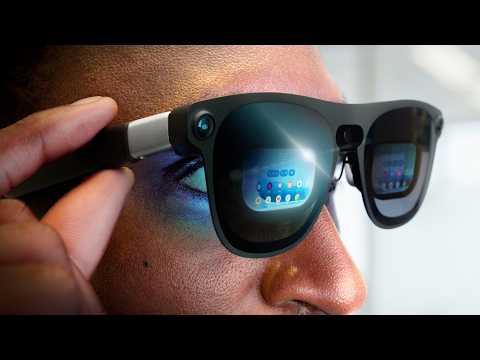
The finale is an exclusive first look at Project Aura, a collaboration between Xreal, Google, and Qualcomm that sits squarely between smart glasses and a VR headset. The glasses run Android XR as their own computer, wired to a smartphone-sized puck running the Snapdragon AR2 Gen 1 chip — a “split computing” design that makes the frames just 91 grams and lets you upgrade the puck or the frames independently. The micro-OLED displays are 1920x1200 per eye at 72 FPS with a 70-degree field of view, the glass has electrochromic tint that blacks out at the click of a button, and tracking latency is literally three milliseconds versus around 12 on the Vision Pro. Less than a year after “Wait, Smart Glasses are Actually Good Now?”, Marques marvels at how much choice the face-computer space suddenly has.
Highlights
”It’s actually literally pretending to be a trackpad”
“So this is obviously a bit of a hack to make this possible. It’s actually literally pretending to be a trackpad to the laptop. But as far as hacks go, this is actually it’s pretty well thought out.” — Marques Brownlee, 0:39
Clip command
yt-dlp --download-sections "*0:39-1:32" "https://www.youtube.com/watch?v=WOzcFkld6_g" --force-keyframes-at-cuts --merge-output-format mp4 -o "magic-screen-trackpad-hack.mp4"”7,200 Hertz refresh rate just to show this object at 30 frames per second”
“Since a full rotation is divided into 480 unique slices, that means just to do 30 FPS video, you have to update these displays 7,200 times per second. 7,200 Hertz refresh rate on these displays just to show this object at 30 frames per second. That is insane.” — Marques Brownlee, 5:02
Clip command
yt-dlp --download-sections "*5:02-6:00" "https://www.youtube.com/watch?v=WOzcFkld6_g" --force-keyframes-at-cuts --merge-output-format mp4 -o "hologram-7200hz-refresh.mp4"”It might cost two displays, but it kind of is two displays”
“So for the person who wants one display to rule them all for their entire desk setup, this is probably the one right now. It might cost two displays, but it kind of is two displays.” — Marques Brownlee, 10:46
Clip command
yt-dlp --download-sections "*10:46-11:23" "https://www.youtube.com/watch?v=WOzcFkld6_g" --force-keyframes-at-cuts --merge-output-format mp4 -o "dell-6k-two-displays.mp4"”Meet Project Aura — an exclusive brand-new first look”
“Well perfect, then meet Project Aura. And this is an exclusive brand-new first look here and actually I can’t think of a better way to explain it than just basically being right in between.” — Marques Brownlee, 11:23
Clip command
yt-dlp --download-sections "*11:23-12:09" "https://www.youtube.com/watch?v=WOzcFkld6_g" --force-keyframes-at-cuts --merge-output-format mp4 -o "project-aura-first-look.mp4"”Literally three milliseconds versus around 12 milliseconds on the Vision Pro”
“I was already super impressed just with the tracking from such few sensors and cameras and the super low latency with this setup as it is. Literally three milliseconds on this setup versus around 12 milliseconds on the Vision Pro.” — Marques Brownlee, 15:08
Clip command
yt-dlp --download-sections "*15:08-15:46" "https://www.youtube.com/watch?v=WOzcFkld6_g" --force-keyframes-at-cuts --merge-output-format mp4 -o "aura-3ms-latency.mp4"Key Points
- Magic Screen snap-on touchscreen (0:08) - Touch-sensitive flexible glass that snaps onto a MacBook with magnets, connects via USB-C, and delivers a full corner-to-corner touchscreen
- It’s a trackpad in disguise (0:39) - The panel works by pretending to be a trackpad to the laptop, but the hack is well executed
- Thoughtful accessory design (0:52) - A folio case counteracts screen wobble, the glass tucks in for travel, and the corner USB-C port doubles as a stopper so you can’t close the glass into the laptop
- Stylus with 100-hour battery (1:18) - Used off-laptop it acts like a transparent Wacom tablet with hover and pressure sensitivity
- Ticking expiration date (1:32) - The rumored MacBook Pro redesign with OLED and touchscreen looms over the product, but not everyone will buy a $5,000 laptop just for touch
- A touchscreen MacBook Pro actually helps this product (2:09) - Apple will have to make macOS touch-friendly (larger touch targets, adaptive UI), which benefits every Magic Screen user too
- $150-ish via Kickstarter (2:59) - Planned to ship after a Kickstarter later this year, which makes Marques nervous, but he wishes them luck
- The “hologram” is two spinning displays (3:47) - Two low-resolution panels back to back rotating around a center axis create a volumetric display
- 900 RPM spin rate (4:31) - About 15 rotations per second, displaying 3D object slices with perfect timing to create the illusion of volume hovering in space
- 480 slices means 7,200 Hz (5:02) - Just 30 FPS video requires updating the displays 7,200 times per second, which is why resolution is limited
- Error correction headroom (5:31) - The motors don’t spin at exactly 900 RPM, so extra processing keeps the slices aligned; the glass dome adds safety and cuts air resistance
- Dell’s 52-inch 6K ultrawide (8:11) - 6144x2560, slightly curved, 120Hz, Thunderbolt — the first single monitor Marques thinks could truly replace his dual-monitor setup
- Same pixel density as a 27-inch 4K (8:51) - 129 PPI keeps text super sharp up close; IPS panel with 100% sRGB and 99% DCI-P3 for $3,000
- Built-in KVM switch for four computers (9:34) - Thunderbolt 4, two HDMI 2.1, two DisplayPort 1.4, picture-by-picture screen partitioning, one keyboard and mouse across machines
- Single-cable desk setup (10:37) - Thunderbolt 4 carries 140W charging, display, and 2.5-gig Ethernet at once
- Project Aura: between glasses and headset (11:23) - An Xreal, Google, and Qualcomm collab that splits the difference between all-day smart glasses and an immersive VR headset
- Runs Android XR as its own computer (12:00) - Wired to a smartphone-sized puck over USB-C, with corner tracking cameras and a center RGB camera anchoring graphics in physical space
- 91 grams, 1920x1200 per eye (12:44) - Micro-OLED at 72 FPS with a 70-degree field of view — less immersive than a headset but far cheaper and lighter
- Electrochromic tint (14:01) - The glass blacks out at the click of a button, going from light-sunglasses clear to basically pitch black
- Split computing is the pitch (14:26) - The Snapdragon AR2 Gen 1 puck handles compute, OS, and AI, and you can upgrade the puck or the frames independently
Mentions
Companies
- Intricate (0:08) - Maker of the Magic Screen snap-on MacBook touchscreen
- Apple (1:32) - Expected MacBook Pro redesign with OLED and touchscreen later this year; macOS not built for touch
- Chef iQ (6:30) - Video sponsor; connected mini oven with 10+ cooking modes
- Dell (8:11) - Maker of the 52-inch 6K ultrawide; released several interesting displays this year
- Xreal (11:33) - Project Aura collaborator; known for simple stationary-display glasses
- Google (11:33) - Project Aura collaborator; Android XR platform
- Qualcomm (11:33) - Project Aura collaborator; Snapdragon AR2 Gen 1 chip in the puck
- Meta (15:27) - Their AR glasses starred in Marques’s video less than a year ago
- Kickstarter (2:59) - The Magic Screen’s planned crowdfunding route
Products & Technologies
- Magic Screen (0:08) - Snap-on touchscreen for MacBooks with folio case and stylus accessories
- macOS Tahoe / iPhone mirroring (0:24) - iPhone mirroring works even better with a fingertip
- MacBook Pro (rumored redesign) (1:32) - Expected with OLED and touchscreen later this year
- Wacom tablet (1:18) - The Magic Screen with stylus acts like a transparent one
- Volumetric display (3:05) - Spinning-panel “hologram” showing 3D objects viewable nearly 360 degrees
- Chef iQ Mini Oven + IQ Sense thermometer (6:44) - Sponsor product; connected oven that knows internal temps
- Dell UltraSharp 52-inch 6K monitor (8:11) - 6144x2560, 120Hz, slightly curved, KVM switch, Thunderbolt 4 with 140W
- Thunderbolt 4 / HDMI 2.1 / DisplayPort 1.4 (9:44) - The Dell’s connectivity for multi-machine switching
- Project Aura (11:23) - AR glasses running Android XR with a split-computing puck
- Android XR (12:00) - The OS anchoring apps and virtual environments in space
- Snapdragon AR2 Gen 1 (14:39) - The chip inside Project Aura’s puck, with fingerprint-reader power button and touchpad front
- Apple Vision Pro (15:14) - Comparison point: ~12ms tracking latency versus Aura’s 3ms
- Electrochromic tint (14:01) - Button-click glass blackout for immersive viewing
People
- Nick DiGiovanni (6:30) - Rated Marques an S-tier chef (sponsor segment)
- Marques Brownlee (0:00) - Host; references his Waveform podcast and his smart glasses video from eight months ago
Surprising Quotes
“And so knowing that, that kind of makes this product feel like it has a ticking expiration date.” — Marques Brownlee, 1:46
“This thing spins at 900 RPM, which is about 15 times every second.” — Marques Brownlee, 4:31
“They say they’re planning on shipping a $150-ish version after a Kickstarter later this year, which definitely makes me nervous, but I’m wishing them luck.” — Marques Brownlee, 2:59
“The key though is it’s going to be way cheaper and lighter than a full-on VR headset, so 91 grams to be exact.” — Marques Brownlee, 12:59
“Literally less than a year ago was my video titled, ‘Wait, Smart Glasses are Actually Good Now?’ with the latest AR glasses from Meta, but like eight months later we already have all this choice, all these different ideas of how these companies want to execute on face computer stuff.” — Marques Brownlee, 15:27
Transcript
Marques Brownlee: 0:00 So MacBooks don’t have touchscreens. But what if they did?
Marques Brownlee: 0:08 This thing here is called the Magic Screen by Intricate. It’s a touch sensitive flexible glass that snaps onto a MacBook with magnets, plugs in via USB type C, and immediately gives that Mac a full corner-to-corner touchscreen. And it works exactly how you’d expect. You can scroll up and down websites and in apps and poke around, do a little bit of photo editing. Of course all the iPhone mirroring in macOS Tahoe works even better since now you’re controlling the app as it was meant to be controlled with your fingertip.
Marques Brownlee: 0:39 So this is obviously a bit of a hack to make this possible. It’s actually literally pretending to be a trackpad to the laptop. But as far as hacks go, this is actually it’s pretty well thought out. They’ve thought about the wobble that comes with touching the screen and made this accessory folio case for it that holds the display up nicely. They’ve thought about travel with it, so it tucks into here really cleverly to make it go with you everywhere the MacBook goes.
Marques Brownlee: 1:07 You also obviously don’t want to accidentally close the glass into the laptop and maybe break it, so they designed this corner USB type C port to also be a stopper so it literally doesn’t let you make that mistake. They even made this stylus accessory as well, so you can use this off of the laptop separately like a transparent Wacom tablet, and that gives it hovering and pressure sensitivity, and it has a 100-hour battery life.
Marques Brownlee: 1:32 But the elephant in the room with all of this is the MacBook Pro update we’re expecting later this year. If you haven’t already heard, it’s we’re expecting a redesign with an OLED and a touchscreen. And so knowing that, that kind of makes this product feel like it has a ticking expiration date. But I do think it’s worth considering not everybody who kind of wants a touchscreen is going to just have to go out and upgrade and buy a new $5,000 laptop to get it, especially when their M2 or M3 is still working perfectly well and probably still will for a couple more years.
Marques Brownlee: 2:09 And the thing is, I think when that MacBook Pro comes out, it’s actually going to make this product better too. Because as of right now, macOS is simply not built for touchscreens. Like they’ve never had touchscreens, the whole thing is designed for mouse and keyboard input. And so yeah, some parts kind of look like they’re starting to lean more towards touch controls like control center and some of these insane controls, but that’s a rant for another day.
Marques Brownlee: 2:32 But the point is, when they do come out with that touchscreen laptop, they will also have to update macOS to be more touch friendly in some ways, like some larger touch targets and some more adaptive UI. And so those things will make it to all of these, and that will make this easier to use. So things like the stoplight window controls, which are definitely too small to consistently press on the first try, that could get way easier. Grabbing the top of a window to move it around, things like that won’t be such impossibly small touch targets anymore.
Marques Brownlee: 2:59 So that’s the bright side. They say they’re planning on shipping a $150-ish version after a Kickstarter later this year, which definitely makes me nervous, but I’m wishing them luck. I’m still not the biggest touchscreen laptop person myself, but I think there’s a some people out there who will love this. I’m going to link it below. It’s definitely dope tech.
Marques Brownlee: 3:05 Now, this video is all about dope tech that is displays. And so this one by definition maybe pushing that limit just a little bit because it’s a volumetric display, aka a hologram.
Marques Brownlee: 3:19 Now, we’ve already done an entire Studio channel video all about this and how it works and why it technically isn’t actually a hologram. But you know what? The technicality doesn’t matter as much. The idea is that it’s creating the effect of a hologram, which is this cool object displayed in 3D space that people can gather around and view it almost at 360 degrees. And the way that it’s creating this effect is actually kind of insane.
Marques Brownlee: 3:47 So, this is what it looks like when it’s off, actually. Right? So you can see here, it’s actually two displays back to back and rotating around this center axis here. And you can actually see individual pixels because it’s not that super high resolution of a screen. But that’s going to make a lot more sense in a second.
Marques Brownlee: 4:06 So like you’ve probably seen one of those spinning fan displays before. If you spin that one line of pixels around really, really fast, you can make a circle. And so if you pulse those LEDs so that they’re in the exact same position each time they light up, you get a floating dot in space, like a pixel. So when you stack a bunch of these lines, that’s when you start to add this Z-axis of depth. But that’s also when it gets incredibly complicated.
Marques Brownlee: 4:31 So, now it’s back on again. This thing spins at 900 RPM, which is about 15 times every second. And as it spins that fast, you can see when it lights these things up, instead of just one dot or one line at a time, which would look like a floating slice, now it has to take 3D objects and display all of the slices next to each other with perfect timing so that as the panels spin around, it creates the illusion of 3D objects with actual volume, sort of hovering still in space.
Marques Brownlee: 5:02 And this is an incredibly complex feat of a ton of processing because since a full rotation is divided into 480 unique slices, that means just to do 30 FPS video, you have to update these displays 7,200 times per second. 7,200 Hertz refresh rate on these displays just to show this object at 30 frames per second. That is insane. And that’s also why it’s not the highest resolution display in the world, because there’s already a ton of compute going on just to make this possible.
Marques Brownlee: 5:31 Also fun fact, there’s even a little bit more processing headroom necessary for error correction because these motors don’t necessarily spin at exactly 900 RPM and so it has to make sure these things all align up perfectly. But when they do, well, you’re going to have to take my word for it because it’s incredibly hard to capture, but it it does look great. It looks so cool in person. Obviously, the display is partially covered up here by a glass dome, partially for safety.
Marques Brownlee: 6:00 Also partially to keep the display spinning with less air resistance inside. So there’s a lot going on here. But yeah, there’s specialized software to show these images and 3D objects made specifically to be shown on volumetric displays. And I just haven’t seen anything else that looks quite like it. If you’re interested in more on recording holograms or why someone might want to beat me up for even calling this a hologram in the first place, definitely watch the studio video linked below. It is one of the most interesting pieces of tech that’s ever come through the studio. Definitely dope tech.
Marques Brownlee: 6:30 Alright, so I know I just got rated an S-tier chef by Nick DiGiovanni and that’s cool and everything, small flex, but I also appreciate when cooking is extremely easy. And that’s where our video sponsor, Chef iQ, comes in. See this piece here is the tech we’re all familiar with, but it’s connected to this mini oven and it turns it into a fully connected cooking setup. Just the oven by itself is already sick. You can just pop onto the screen whatever you want to cook, fish, chicken, steak, or even eggs, and it knows how to cook it perfectly.
Marques Brownlee: 7:01 It can air fry, it can bake, broil, dehydrate, whatever. There’s literally 10 plus cooking modes built in and it does all of them well so you can replace multiple things on your countertops. And if we go ahead and check on these, perfectly toasted. Something else this is really good at by the way is eggs. Might not be expected, but it actually comes with this egg tray. You can crack an egg in six of these and make fried eggs basically perfectly every single time however you want.
Marques Brownlee: 7:18 Something else to note people don’t really think about is this thing still gets up to 500 degrees, but it is way smaller than a traditional oven. And so it preheats way faster, so I’ve been using my traditional oven less. But even better, pair it with the IQ sense thermometer and now it knows when the food is done. So like if it’s chicken, it knows what the internal temps should be and it nails that every single time.
Marques Brownlee: 7:38 And of course there’s an app too. So now if I have something going for much longer, I totally leave the room and then I can check on progress at any time and of course get a notification when it’s actually done. So if you too want to be an S-tier chef, but way easier, you can save 40% with code MKBHD at the link in the description. And yes, I did say 40%. You’re welcome. Alright, on to the next item.
Marques Brownlee: 8:11 Okay, so this monitor. It almost looks reasonable because of how far away from it I’m sitting right now, but it’s not. This is a 52 inch ultra-wide 6K slightly curved 120 hertz Thunderbolt monitor from Dell.
Marques Brownlee: 8:30 And Dell actually came out with a bunch of interesting displays this year, but this, in my opinion, is the most interesting one. And the reason it’s interesting to me is because I’ve been a dual monitor person for a long time. You’ve seen my desk setups. This is the first single monitor that I actually feel like I could use, and I’ve tried a lot of ultra-wides, but the first single monitor I think I could actually use to replace dual monitors and like go all the way and not lose a beat.
Marques Brownlee: 8:51 So first of all, 6K resolution, of course. That’s 6144 by 2560. So it’s not 8K or anything, but it’s still enough pixels that it works out to be basically the same pixel density as a 27 inch 4k monitor so 129 pixels per inch. Text is still super sharp, corners are crisp, so you could sit much closer to it without it breaking down at all.
Marques Brownlee: 9:11 And then it just looks really good, especially for not being an OLED. It has these thin bezels all the way around, it’s a slightly anti-glare finish, and it’s an IPS panel, 100% sRGB and 99% of DCI-P3 color. It’s not like the absolute highest end color grading type of panel, but it is $3,000 and for all that money you do get a very physically impressive and imposing display.
Marques Brownlee: 9:34 But the feature that makes this really interesting, especially for someone who uses multiple machines, is this has a built-in KVM switch for up to four computers at once, and then a bunch of really nice software surrounding it. So you’ve got Thunderbolt 4, there’s two HDMI 2.1 ports, two DisplayPort 1.4 ports, you can have multiple machines plugged in and then switch between them with one keyboard and mouse.
Marques Brownlee: 9:54 And that’s basically what it’s designed around. So instead of, you know, picture in picture, they have these picture-by-picture modes with screen partitioning into a bunch of different arrangements. This is what makes it a viable replacement for dual displays. You can even put everything on a single display even from multiple machines. It’s a multi-monitor setup on one monitor all at once.
Marques Brownlee: 10:12 And the slight curve is also really nice. You can kind of see here at the edges, there are some much more dramatically curved ultrawide monitors and that’s… it looks cool and everything, but this is a little closer to mimicking the actual angle that I have my dual displays in front of me at my desk. Because when you have two big displays next to each other, having them flat just ends up making the corners really far away from you when you’re sitting in the middle. But the slight curve just helps just… it’s a subtle thing, but it helps keep things a little bit more directly in front of you so there’s less head turning.
Marques Brownlee: 10:37 And that Thunderbolt 4 connection, that’ll do the 140 watts of power, so you plug it into your laptop through this single cable, you’re charging, you’re displaying, you can get two and a half gig Ethernet through there all at once, it’s great. So for the person who wants one display to rule them all for their entire desk setup, this is probably the one right now. It might cost two displays, but it kind of is two displays. So I like it. It’s Dope Tech.
Marques Brownlee: 10:57 Okay, let me ask you a question: smart glasses or VR headset? Which one are you more into? Because a smaller wearable pair of glasses you can wear all day and then it gives you convenient stuff like a heads-up display with notifications and directions and translations and it looks inconspicuous. Or there’s the full-on headset, which has the nicest displays but it completely takes over your vision for the most immersive detailed high-resolution content experience.
Marques Brownlee: 11:20 If you answered neither, but you still kind of like some parts of both? Well perfect, then meet Project Aura. And this is an exclusive brand-new first look here and actually I can’t think of a better way to explain it than just basically being right in between.
Marques Brownlee: 11:33 They’re a collab between Xreal, Google, and Qualcomm to bring this to life and I don’t know if you’ve seen some of the other Xreal glasses but they’re actually very simple. The idea is you essentially have a stationary display that you put in front of your face and now you have like a hundred inch display effectively wherever you go.
Marques Brownlee: 12:00 anywhere you want to go. It’s clever, but that was very much plug and play with other devices. This new Project Aura runs Android XR, which means a couple things. First of all, it’s its own computer, it’s wired to this smartphone-sized puck here by USB-C. And then it has its own sensors around the frame so that it can bring in your environment and anchor the graphics in physical space. So those two cameras on the corners on the outside are just for tracking and then there’s a single RGB camera in the middle.
Marques Brownlee: 12:27 So when you fire these up, you look like this, but you see this. Android XR locked hovering in space in front of you. And then you can do everything here that you could do in the VR headset. You can open any of those Android apps, watch videos, move around virtual environments.
Marques Brownlee: 12:44 And they’re pretty good-looking displays too, to my eye, 1920 by 1200 per eye. They’re Micro-OLED at 72 FPS. But obviously the 70-degree field of view is nice for glasses, but that’s going to be less than a full-on VR headset. The key though is it’s going to be way cheaper and lighter than a full-on VR headset, so 91 grams to be exact.
Marques Brownlee: 13:07 And so you’re sort of you’re trading off the immersiveness of a full-on headset for the ability to see a bit more around you, looking through real glass to see the actual environment behind the UI. And so since they’re lighter, they end up a bit more comfortable and you might even be tempted to get up and walk around in them or just wear them for a longer period of time than you would have worn a headset.
Marques Brownlee: 13:31 There’s this feature that lets you while you’re watching a video pin it to the corner of your vision so you can walk around with it like a little mini video player in a little HUD in the corner of your vision. It’s kind of perfect for doing the chores and walking around or doing the dishes while listening to the Waveform podcast. Like before to take a video with you in a VR headset you’d like have to pinch it and hold it and then hold it while you’re walking around literally taking it with you. So they’ve clearly thought about how much more likely you are to do that with these glasses than a regular headset.
Marques Brownlee: 14:01 And then if you ever just want to watch a video or movie with just a black background instead of the environment around you, the glass has an electrochromic tint built in so you can black them out with the click of a button, which is pretty fire. The glass all the way clear is like the equivalent of a light pair of sunglasses. It’s not totally clear, but you can still definitely see the real world with the AR elements locked in. And then all the way tinted is basically pitch black.
Marques Brownlee: 14:26 So when this actually goes on sale, the pitch is actually going to be split computing, which is basically just the idea that you have the compute in the glasses and the compute in the puck as separate and that comes with some unique advantages. Like the puck is running the new Snapdragon AR2 Gen 1 chip inside, so it’s high end now and has a power button that doubles as a fingerprint reader and the whole front of it is a touchpad. That’s doing most of the compute, it runs the OS, it runs all the AI stuff.
Marques Brownlee: 14:53 But when someday maybe that gets outdated, you can upgrade just the puck and then plug it in by USB type-C to the frames. Or maybe someday in the future you decide, yeah, I kind of want better frames. I want a wider field of view… …two or more resolution or whatever it is, some new frames come out. Okay, then you can upgrade just the frames and keep the same computer.
Marques Brownlee: 15:08 I was already super impressed just with the tracking from such few sensors and cameras and the super low latency with this setup as it is. Literally three milliseconds on this setup versus around 12 milliseconds on the Vision Pro. But yeah, the idea is this is somewhat modular, so you can update it one piece at a time in the future, and that alone is very clever.
Marques Brownlee: 15:27 Literally less than a year ago was my video titled, “Wait, Smart Glasses are Actually Good Now?” with the latest AR glasses from Meta, but like eight months later we already have all this choice, all these different ideas of how these companies want to execute on face computer stuff. And that’s fascinating, and it is dope tech. Thanks for watching. Catch you guys in the next one. Peace.