What's on my Phone 2026!
What’s on my Phone 2026!
Summary
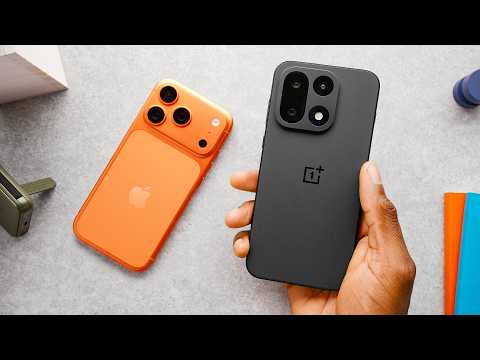
MKBHD reveals his 2026 daily driver phone setup, showcasing a two-phone system with the OnePlus 15 as his primary Android device and the iPhone 17 Pro in Orange as his secondary phone. He walks through his home screen layouts, favorite apps, and widgets on both devices, explaining why he chose each app and how his setup has evolved over five years. The video highlights productivity tools like TickTick, weather apps like CARROT Weather, podcast apps including Pocket Casts and Neuecast, and cross-platform utilities like Blip for file sharing. He also discusses iOS features like Liquid Glass and the Action button, Android advantages like scrollable widgets, and closes with a Dbrand Black Friday sponsorship.
Highlights
”Do I regret getting orange?”
Clip command
yt-dlp --download-sections "*6:07-7:00" "https://www.youtube.com/watch?v=KW21q_7U6Ao" --force-keyframes-at-cuts --merge-output-format mp4 -o "KW21q_7U6Ao-6m07s.mp4"“Do I regret getting orange? Uh, yeah, a little bit. Yeah. I wish there was a black one.” — Marques Brownlee, 6:12
”Gemini on lock screen because Siri is bad”
Clip command
yt-dlp --download-sections "*6:30-7:20" "https://www.youtube.com/watch?v=KW21q_7U6Ao" --force-keyframes-at-cuts --merge-output-format mp4 -o "KW21q_7U6Ao-6m30s.mp4"“I have also got Gemini on the lock screen because Siri is bad.” — Marques Brownlee, 6:32
”Why can’t iPhone widgets scroll?”
Clip command
yt-dlp --download-sections "*4:05-4:55" "https://www.youtube.com/watch?v=KW21q_7U6Ao" --force-keyframes-at-cuts --merge-output-format mp4 -o "KW21q_7U6Ao-4m05s.mp4"“Why can’t you do that on the iPhone yet? They’ve had widgets for… None of them scroll. Let us scroll.” — Marques Brownlee, 4:12
”Flighty is one of the most useful apps of all time”
Clip command
yt-dlp --download-sections "*10:55-11:40" "https://www.youtube.com/watch?v=KW21q_7U6Ao" --force-keyframes-at-cuts --merge-output-format mp4 -o "KW21q_7U6Ao-10m55s.mp4"“Flighty, which is, as someone who’s… one of the most useful apps of all time.” — Marques Brownlee, 11:00
”Phone app feels weird not to have”
Clip command
yt-dlp --download-sections "*2:25-3:15" "https://www.youtube.com/watch?v=KW21q_7U6Ao" --force-keyframes-at-cuts --merge-output-format mp4 -o "KW21q_7U6Ao-2m25s.mp4"“I really don’t make that many phone calls, but for whatever reason it feels weird not having the phone app down there, so it’s always there.” — Marques Brownlee, 2:31
Key Points
- 0:08 - Last time he did this video, Samsung was his daily driver and Dark Sky was his favorite weather app
- 0:29 - Uses a two-phone setup: Android is the main phone, iPhone is secondary
- 0:56 - Almost settled on OnePlus 15 + iPhone Air combo, but subpar cameras on both was a deal breaker
- 1:17 - Phones he goes back to most: Galaxy S25 Ultra, Pixel 10 Pro, and now OnePlus 15
- 2:07 - OnePlus 15 lock screen has flashlight and Gemini shortcuts
- 2:25 - Main dock apps: TickTick (tasks), Spotify, Google Messages, Phone
- 2:54 - Uses Notion for keeping track of everything, but could easily replace it
- 3:44 - Second page has calendar widget, Waze, Google Home, Threads, X, and Arc browser
- 4:07 - Android widgets can scroll; iPhone widgets still cannot
- 4:27 - Uses Raindrop.io for saving links (replaced Pocket which is gone)
- 4:54 - Yahoo Fantasy for fantasy sports
- 5:02 - Blip is a cross-platform file sharing app better than AirDrop
- 5:20 - Uses Pocket Casts for podcasts, keeps music and podcasts in separate apps
- 5:35 - Praises OxygenOS for being clean and not requiring customization
- 6:12 - Regrets getting the orange iPhone 17 Pro, wishes there was a black one
- 6:32 - Has Gemini on iPhone lock screen because “Siri is bad”
- 6:39 - Keeps Liquid Glass design enabled on iPhone
- 6:53 - Action button is set to create new tasks in TickTick
- 7:33 - Uses Copilot for finance tracking and Superhuman for email
- 7:36 - CARROT Weather cloned Dark Sky’s features with added personality
- 8:13 - Tesla app is for solar/Powerwall, not a Tesla vehicle
- 8:35 - Has widgets for Porsche, Rivian, and Tesla showing real-time status
- 8:48 - Uses “not boring weather widget” for visual appeal despite accuracy concerns
- 9:05 - Uses iOS smart stack that learns which apps he wants to open
- 9:25 - Neuecast might replace Pocket Casts for podcasts
- 9:44 - Athlytic provides Whoop-like fitness data using Apple Watch/Health data
- 10:58 - Authenticator app lives on iPhone for long-term stability
- 11:00 - Flighty is “one of the most useful apps of all time” for flight tracking
- 11:56 - Uses Dbrand Prism screen protector on both phones
Mentions
Companies
| Company | First Mention | Context |
|---|---|---|
| OnePlus | 0:56 | Main Android phone manufacturer |
| Apple | 1:00 | iPhone 17 Pro and iPhone Air |
| Samsung | 0:11 | Previous daily driver, Galaxy S25 Ultra |
| 1:20 | Pixel 10 Pro, Gemini, Google Home, Google Keep, Google Messages | |
| Tesla | 8:13 | Solar and Powerwall app |
| Porsche | 8:35 | Vehicle widget on iPhone |
| Rivian | 8:37 | Vehicle widget on iPhone |
| Yahoo | 4:54 | Fantasy sports app |
| Spotify | 2:27 | Music streaming |
| Dbrand | 11:56 | Sponsor - screen protectors and cases |
| Arc / The Browser Company | 3:48 | Arc browser app for cross-platform sync |
| Meta | 3:44 | Threads social media |
| X (Twitter) | 3:44 | Social media app |
| Whoop | 9:46 | Fitness tracking strap (competitor to Athlytic) |
Products/Apps
| Product/App | First Mention | Context |
|---|---|---|
| OnePlus 15 | 0:56 | Primary Android daily driver |
| iPhone 17 Pro | 1:57 | Secondary phone in Orange |
| iPhone Air | 1:00 | Considered but rejected for subpar camera |
| Galaxy S25 Ultra | 1:17 | Previous go-to Android phone |
| Pixel 10 Pro | 1:20 | Previous daily driver option |
| TickTick | 2:25 | Primary task management app |
| Gemini | 2:13 | AI assistant on lock screens |
| Notion | 2:54 | Note-taking and organization |
| YouTube Studio | 2:53 | Channel management |
| Relay | 2:36 | Reddit client |
| Waze | 3:32 | Navigation app |
| Google Home | 3:34 | Smart home control (now includes Nest) |
| Arc Browser | 3:48 | Web browser for cross-platform sync |
| Raindrop.io | 4:27 | Bookmark/link saving (replaced Pocket) |
| Google Keep | 4:42 | Shopping lists via Google Assistant |
| 4:34 | Former link saving app (discontinued) | |
| Dark Sky | 0:13 | Former favorite weather app (discontinued) |
| Blip | 5:02 | Cross-platform file sharing |
| Pocket Casts | 5:20 | Podcast app |
| OxygenOS | 5:35 | OnePlus Android skin |
| Liquid Glass | 6:39 | iOS design language |
| Copilot | 7:33 | Finance tracking app |
| Superhuman | 7:35 | Email client |
| CARROT Weather | 7:36 | Weather app with Dark Sky clone features |
| Not Boring Weather | 8:48 | Visually appealing weather widget |
| Neuecast | 9:25 | Podcast app (potential Pocket Casts replacement) |
| Athlytic | 9:44 | Fitness tracking using Apple Health data |
| Flighty | 11:00 | Flight tracking app |
| Apple Watch | 9:57 | Wearable for fitness tracking |
| Dbrand Prism | 11:56 | Screen protector |
| Grip Case | 12:25 | Dbrand phone case |
| Ghost Case | 12:27 | Dbrand phone case |
| Tank Case | 12:32 | Dbrand rugged phone case |
| Killswitch | 12:36 | Dbrand product |
| Darkplates | 12:39 | Dbrand product |
People
| Person | First Mention | Context |
|---|---|---|
| MKBHD (Marques Brownlee) | 0:02 | Video creator/host |
Surprising Quotes
“Do I regret getting orange? Uh, yeah, a little bit. Yeah. I wish there was a black one.”
“I have also got Gemini on the lock screen because Siri is bad.”
“Why can’t you do that on the iPhone yet? They’ve had widgets for… None of them scroll. Let us scroll.”
“I really don’t make that many phone calls, but for whatever reason it feels weird not having the phone app down there, so it’s always there.”
“Flighty, which is, as someone who’s… one of the most useful apps of all time.”
Transcript
0:00 (futuristic digital music) Hey, what’s up? I’m MKBHD here. And welcome to What’s on my Phone, 2026, maybe by the time you’re watching this. So last time I did this, a Samsung phone was my daily driver. Dark Sky was one of my favorite apps. That doesn’t exist anymore. RIP. And you know, year-to-year, my phone setup doesn’t change that much, but over the five years it’s well, there’s some added change over time. So this is my new daily setups.
0:29 Now a lot of you already know I’ve been a two phone… So yes, two sim cards, two… And as long as I’ve had two phones, it’s always been one Android… And a lot of people always ask me and maybe don’t even know, the main phone is the Android phone and that’s the phone and that’s the one I mainly use. And then the second one is the iPhone.
0:50 And so the setup that that I almost settled on for a little bit was gonna be OnePlus 15 and iPhone Air. And the reason for that is I… of phones during the course of the year, but in between testing phones, I will go back to a daily driver that I can sort of rely on. And so among all the stuff the phones that I’ve gone back to the most have been Galaxy S25 Ultra, then Pixel 10 Pro and now this OnePlus 15.
1:24 Now if you watch my review of this phone, you already know how much I like most of the things about it, and it has great battery life and it’s awesome performance. And so because the iPhone is the secondary phone most of the time, it could get away with not… So iPhone Air, which is actually a really nice phone aside was kind of a perfect pair from it. But unfortunately, the two phones that I was using at the same time, both having pretty subpar cameras, to me was kind of the deal breaker.
1:54 So I have actually mostly been sticking to the iPhone 17 Pro in Orange and not the Max. So this is the two phones, and the iPhone 17 Pro. So let’s start with the OnePlus 15. And this is my lock… I’ve got the flashlight and Gemini shortcuts set up at the bottom.
2:15 And then the home screen is pretty stark. I think basically my Dock for the last decade. But the apps that I mainly… are TickTick, which is my tasks app, Spotify, Google Messages, and then the phone app. I really don’t make that many phone calls, but for whatever reason it feels weird not having the phone app down there, so it’s always there.
2:36 And then I have Relay for… There’s not that many for obvious reasons, but I do pay the five… The OnePlus Photos app, which… It syncs with Google… That’s why I don’t use the YouTube Studio app and Notion. Notion is the one that for keeping track of everything. But it also feels like the one that I could most easily replace because I mostly engage with… that could be Slack or or something else over there. But most of those apps I don’t… I get to with notifications.
3:14 But yeah, other than… and then a bunch of blank. So then my second page has… I’ll try to link the third party apps that aren’t like super obvious here. So this calendar widget… And then underneath it I… and these tools that I use fairly often. So you’ve got Waze, you’ve… the Google Home app, which is really nice because it used to between Home and Nest, but they finally updated everything to work in the Home app.
3:44 And then Threads and X. And I actually have the Arc Search here, the Arc browser app, which I… because they’re kind of not… But it is still kind of useful to have mobile sync from a… So it’s not my default browser, but it lives there on my home…
4:05 Also, just a quick mention because I don’t know why… This is a scrollable widget for scrolling through… Why can’t you do that on the iPhone yet? They’ve had widgets for… None of them scroll. Let us scroll.
4:19 Anyway, the last page, I… of random apps of the moment, things that I may be… ‘cause I was just flying. I use the Raindrop.io app to save links and I use that because the… I used to use Pocket all the time for this and there was a Pocket extension in Chrome and all this stuff and now it’s gone. So I use Raindrop.io for…
4:42 And then Google Keep, because that’s where it automatically adds stuff to your shopping list when you ask Google to… it puts it in Keep for some reason. So that’s why Keep’s there. And Yahoo Fantasy, so I can get crushed in two different fantasy… It’s going great.
5:00 Another couple of apps I find useful, Blip is one that I found pretty recently. It’s kind of like a nice, and file sharing app, but it’s actually more than just Airdrop because it can do it… So I can Blip something to… if they have an account. It’s super useful for file all that stuff. Very quick.
5:20 And I also still use Pocket Casts for all of my podcasts on the go. There’s a bunch of… but that’s the one I’ve stuck with. Spotify, for me, is really… I don’t like having them… So yeah, Pocket Casts is my go-to.
5:35 And then shout out to OxygenOS for being pretty cleanly, nicely set up that I don’t feel like I have… I’ve got the lock screen… I’ve got my home screen… It’s not like the Samsung phone days where I was changing a whole… to get it to work the… So it’s good stuff.
5:53 By the way, huge shout out to… that’s finally launched. It’s really soft and comfortable but also really high quality stuff. The reviews are in, so clearly people are enjoying it. I’ll leave a link below at the brand new mkbhd.com.
6:07 But now on to my very… Do I regret getting orange? Uh, yeah, a little bit. Yeah. I wish there was a black one. The thing about like these orange bezels showing around the front, but I’ve set up a kind… to try to just own the Creamsicle thing.
6:30 So anyway, this is my iPhone 17 Pro. I have also got Gemini on the lock screen because Siri is bad and… And then for those wondering, I do have my Liquid Glass still on. I haven’t toggled it off. I think it looks okay, but I also kind of just wanna know what people’s default… So I haven’t changed that. I…
6:50 And then my Action button is to start a new task in my… So I basically live in the TickTick app. It’s how I remember to… and having the ability to and then just start and it throws it in my… I just, I love that Action button feature.
7:13 And then on my home screen, I kind of just have all of the apps I use, mostly just here, all reachable. It’s kind of set up in a way that if I hold it in my right… So you’ve got the photos, YouTube and YouTube Studio. And then Waze.
7:30 Bottom right corner here is… Copilot is a finance tracker app and then Superhuman for email. CARROT, over on the left is… So you guys might know Dark Sky was one of the best… And essentially what CARROT did was clone the Dark Sky but then also gave us a with other stuff, like weather sources. And it’s added a bunch of stuff on top. There’s a snarky little assistant that describes the weather in English. So it’s a pretty good app. I use CARROT Weather most of the time.
8:07 And then in the Dock, of… Again, I don’t know why. It feels weird to not have it there. But I also hardly ever call anyone. The Tesla app, Arc browser app again just to have the cross platform thing, but I would change it in a heartbeat. And Messages.
8:21 By the way, the Tesla is not for any Tesla vehicle that I own. It’s just for the solar and… So anytime I open it, I can check to see what’s going on in there.
8:31 But that actually brings… which is just three widgets. It’s Porsche’s widget at the top, it’s Rivian’s widget in the middle and it’s Tesla’s widget at the bottom. All of those are like real-time updated with whatever the current numbers or status things are…
8:46 And then the next home screen is a larger, not boring weather widget. Really, really pretty app. I don’t necessarily love… or the accuracy of the information, but it’s so pretty that I like just getting a bird’s eye view of like a glanceable version… So, really love the widgets.
9:05 And then underneath this, this is actually a serious smart stack. So this grid of eight icons changes based on what it thinks I wanna open, and it’s learned me very well, I will say. So the apps that show up here are usually what I’m aiming for.
9:18 And then that last home… this is just the apps of the moment again, which is actually some… So this one here is called Neuecast. I use Pocket Casts most of the time, but Neuecast is one that I found that might replace Pocket Casts for me. It’s a really clean layout and just shows me my most… from all the ones I’m subscribed to.
9:41 And then another one… Athlytic’s really good. I know a lot of people who use Whoops. Whoop is the strap you wear to… and it’s got a subscription and gives you a lot of… which is super useful. But I wear an Apple Watch and I don’t wanna also wear another thing to measure that fitness information.
10:02 So what Athlytic does is takes the information and from Apple Health, aggregates it all and gives me a lot of that the Whoop would. So yeah, it’s a subscription, and exertion for the day and stress levels and calories burned and… I like Athlytic. I recently found that this year too, so that’s another one of…
10:26 Anyway, then there are a couple more apps that I have on my iPhone because they are iPhone apps or because they are on a phone that I will have more long-term. Just, as someone who… if I switch out my phone and I keep like my phone car key on it, it kinda gets annoying… So I usually do long-term… but there’s also a couple of others.
10:55 So my authenticator app is… And there’s another app called Flighty, which is, as someone who’s one of the most useful apps of all time. It basically just pulls the… and often notifies me before… And then it also aggregates like how many hours I’ve…
11:18 And then of course I also have… Every device that I have Blip installed on can send or receive Blips to each other. It’s super useful.
11:28 Anyway, that’s basically my app setup. I will say shout out to a studio video where a bunch of people given a lot of their favorite apps. So I’ll link that below. Maybe you’ll find some… But as far as the stuff on the somewhat daily, it’s my OnePlus 15, it’s my iPhone 17 Pro and… So that of course covers the… But what you probably didn’t…
11:55 (futuristic digital music) a screen protector from… I’ve been using these for like, the better part of a year now. They obviously protect the glass and they’re super easy to install. So if you wanna pop one on, maybe it saved your phone and you wanna replace it, you kind of just swipe… It aligns, squeegee the… So that’s what I’ve been doing.
12:18 Now you already know and thanks to Dbrand’s Black Friday sale, you can grab a Prism and save 40% when you bundle it with a Grip Case, 40% when you bundle it with a Ghost Case or 25% if you pair it with their all-new, super-rugged Tank Case.
12:34 They’ve got other legit… You can save $45 on a Killswitch kit, 50% off Darkplates, and, get this, every order comes with a free set of these ridiculously over the top Dbrand custom playing cards.
12:51 I’ve been plugging Dbrand stuff for the better part of a decade now. But if you’ve ever been on the fence about checking out any of this stuff, now would be the time with… So links will be below.
13:01 Thanks for watching. Catch you guys on the next one. Peace. (futuristic digital music)