iPadOS 26: Ready for Laptop Duty?
Summary
MKBHD reviews iPadOS 26 after three weeks of testing, evaluating whether the iPad can finally replace a laptop. The update brings significant improvements to window management, allowing users to resize any app window freely and have up to eight windows open simultaneously. While the iPad is now more capable than ever as a computer, MKBHD concludes that the question has shifted from “Can the iPad replace a laptop?” to “Do I want it to?” He finds that the iPad excels in versatility - offering a better lean-back experience, touchscreen, Apple Pencil support, and cellular connectivity - but still recommends a laptop if computing is your primary need. The iPad’s strength lies in being more versatile than a laptop, not in being a laptop replacement.
Highlights
”Apple Finally Did The Thing”
Clip command
yt-dlp --download-sections "*0:02-0:55" "https://www.youtube.com/watch?v=AphNalSmvlk" --force-keyframes-at-cuts --merge-output-format mp4 -o "AphNalSmvlk-0m02s.mp4"“When iPadOS 26 got announced, it looked like a game changer. It felt like everybody on the internet who was waiting for years just watched Apple finally do the thing. They just made the iPad a computer.” — Marques Brownlee, 0:02
”Can I? vs Do I Want To?”
Clip command
yt-dlp --download-sections "*6:51-7:55" "https://www.youtube.com/watch?v=AphNalSmvlk" --force-keyframes-at-cuts --merge-output-format mp4 -o "AphNalSmvlk-6m51s.mp4"“The question isn’t actually, ‘Can I replace my laptop with an iPad?’ Because yes, I can. The question really became ‘Do I want to?’” — Marques Brownlee, 6:57
”What You’ve Created is Basically a Laptop”
Clip command
yt-dlp --download-sections "*9:18-10:20" "https://www.youtube.com/watch?v=AphNalSmvlk" --force-keyframes-at-cuts --merge-output-format mp4 -o "AphNalSmvlk-9m18s.mp4"“But then look at what you’ve created, like adding a mouse and a keyboard, a display, the Folio case, like the whole thing is suddenly basically the same thickness and weight as a laptop again. So you might as well just get the laptop.” — Marques Brownlee, 9:32
”It’s Still an iPad, Which is Pretty Sweet”
Clip command
yt-dlp --download-sections "*10:19-11:20" "https://www.youtube.com/watch?v=AphNalSmvlk" --force-keyframes-at-cuts --merge-output-format mp4 -o "AphNalSmvlk-10m19s.mp4"“So no doubt the ceiling of what an iPad is capable of as a computer has been raised, but it’s still an iPad, which is pretty sweet too.” — Marques Brownlee, 11:02
Key Points
- 0:02 - iPadOS 26 looked like a game changer when announced, with many feeling Apple finally made the iPad a real computer
- 0:38 - MKBHD installed iPadOS 26 beta immediately and removed the MacBook from his backpack for three weeks of testing
- 1:32 - Success criteria: being able to stop carrying a laptop (except for video editing)
- 2:27 - Major improvement: new window management system that dramatically improves multitasking
- 2:42 - Any app can now be resized freely by dragging corners, with overlapping windows and fluid multitasking
- 3:09 - Window management tricks: flick to half-screen, double-tap for full screen, swipe down for Mac-like menu bar
- 3:53 - Multi-window mode is toggleable via Control Center - can switch between classic iPad mode and windowed mode
- 4:45 - Window limit increased from 4 to 8 simultaneous windows
- 5:18 - Mac still superior: no practical window limit, more RAM, more flexibility
- 5:30 - iPad Mini also supports full multi-window functionality despite smaller screen
- 6:16 - Real-world test: signing and returning a PDF via Slack - doable but with more friction than on a computer
- 6:51 - Key realization: the question isn’t “Can I replace my laptop?” (yes) but “Do I want to?”
- 7:35 - iPad advantages: beautiful display, lighter weight (1 pound lighter), focused single-app experience
- 7:57 - Limitation: can’t have multiple audio sources (music + YouTube video) simultaneously
- 8:12 - Keyboard case is improved but still top-heavy and clunky compared to a laptop
- 8:35 - Files app improved: external storage support, file info, server connections - but file locations can be confusing
- 9:27 - With all accessories (mouse, keyboard, display, Folio case), iPad becomes same thickness and weight as a laptop
- 9:49 - iPad’s unique advantages: lean-back experience, camera for photos/videos, cellular, Apple Pencil for notes/art
- 10:24 - Final verdict: if you only need a computer, get a laptop; if you want versatility, consider what tasks you’ll do and whether you’d prefer them on iPad or computer
Mentions
Companies
- Apple - Referenced throughout as the maker of iPad and Mac
- Slack - Mentioned as a communication tool used for work tasks
Products
- iPadOS 26 - The main subject of the video, Apple’s latest iPad operating system
- iPad - Apple’s tablet device being reviewed
- iPad Mini - Smaller iPad that also supports the new multi-window features
- Mac/MacBook - Apple’s laptop, used as comparison point throughout
- iOS 26 - Related Apple software update mentioned at end
- Liquid Glass - Design element mentioned in iOS 26
- Folio case - iPad keyboard case accessory
- Apple Pencil - Stylus for handwriting and art (implied by “handwritten notepad” and “artist’s canvas”)
- Control Center - iOS/iPadOS feature for quick settings access
- AirDrop - Apple’s file sharing feature
- Files app - iPad’s file management application
People
- Marques Brownlee (MKBHD) - The video creator and reviewer
- Jordyn Edmonds - Credited for intro track music (from description)
Surprising Quotes
“The question isn’t actually, ‘Can I replace my laptop with an iPad?’ Because yes, I can. The question really became ‘Do I want to?’”
“I don’t know that there’s a difference between minimizing and closing an app on the iPad. ‘Cause when I close an app, it just goes away. But the minimizing version - so hey, give the people what they want.”
“But then look at what you’ve created, like adding a mouse and a keyboard, a display, the Folio case, like the whole thing is suddenly basically the same thickness and weight as a laptop again. So you might as well just get the laptop.”
“So no doubt the ceiling of what an iPad is capable of as a computer has been raised, but it’s still an iPad, which is pretty sweet too.”
Full Transcript
0:00 (upbeat music)
0:02 So when iPadOS 26 got announced, it looked like a game changer. And I wasn’t the only one saying that. Many, many people had the same feeling watching all this new stuff. It felt like everybody on the internet who was waiting for years just watched Apple finally do the thing. They just made the iPad a computer.
0:24 But, you know, this is Apple and there’s no way they would just turn the iPad into a Mac, right? They still need to sell Macs. Obviously there’s gotta be some catch.
0:35 So I did what any logical person would do. I installed iPadOS 26 beta as soon as it was available on my iPad. And then I took my MacBook out of my backpack. So I’ve been living with just the iPad for the past three weeks or so now to be able to give you a real answer.
0:52 So first things first. I already loved my iPad Pro. Like full disclosure, it was one of my favorite pieces of tech, and I’ll also admit that because when you also have a laptop to do any work tasks and stuff that I need to get done, this just kind of became like a media consumption device. Like lots of YouTube videos, some occasional email or Slack. And then once in a while, I’ll have some fun with image editing or playing a game or two. But again, if I have my laptop with me, which I almost always do, then this extremely powerful iPad just sits there.
1:32 So I would consider this update a success if I can stop carrying my laptop everywhere. Except for editing. I know I’m probably always going to need my laptop for that just based on my workflow. But for everything else, I wanted to see if the iPad could do it. So that’s what I did and I was actually pretty impressed.
1:49 Now the thing is I feel like other YouTubers have taken on this exact challenge before with previous versions of iPadOS. They’ve probably used the same titles: “Can this iPad be a laptop?” “Can the iPad be my full-time productivity machine as a student?” “Can it be my only computer?” “What is a computer?” Each one of those videos details the walls that you run into when you try to do real work on the system that is iPadOS.
2:20 With this latest update, some of those walls have been torn down, and some of those walls are just a little bit lower.
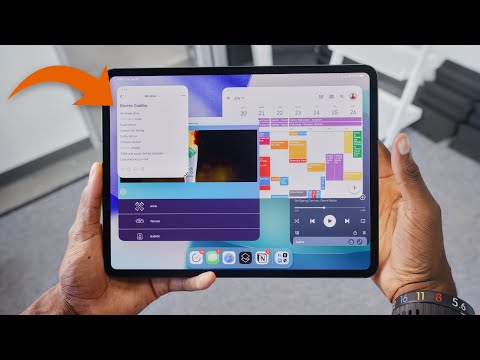
2:27 So here’s an example. The thing you’ve probably already heard about is this new window management system. And it is awesome, or at least it’s dramatically improved. It breaks down the wall of multitasking with several windows on the screen at once.
2:42 Literally any app you open on the iPad, you can drag the corner to whatever size you want and then you can just go crazy opening a bunch of overlapping windows, moving them around, going back and forth and multitasking to your heart’s content. It’s never been quicker or easier to get into this sort of workflow, which feels very Mac-like.
3:03 And then there’s plenty of tricks to managing the windows once you’re there. Like you can flick a window to each side to take up half the screen. That’s super useful. You can double tap the top of any app for it to go back to full screen. And then at any time, you can swipe down to see the menu bar for an app, which looks exactly like it would on a Mac and includes the stoplight buttons to maximize or minimize or close windows.
3:28 And also, I gotta be honest, I don’t know that there’s a real difference between minimizing and closing an app on the iPad. ‘Cause when I close an app, it just goes away. If I minimize an app, it just goes away. But the minimizing version keeps it in memory. So hey, give the people what they want.
3:51 But I think the most important thing about this multi window mode is just that. It’s a mode that you can toggle on or off with a single touch in the Control Center. So I found this super useful. When it’s off, you know, apps open full screen every time like they always did, the handle at the bottom corner is gone and you can pull down to get notifications or Control Center and swipe across the bottom to switch apps.
4:16 This is the iPad we’ve always known and it still works exactly like that. But if you go to Control Center and go into windowed mode, suddenly that resizing anchor appears, use it wherever you want. Also swiping down from the top now shows the menu bar instead of notifications, or swipe down from the far left. And multitasking remembers your window positions and even window sizes as you’re working. It’s very powerful, even in beta.
4:45 You can now have up to eight windows open at the same time instead of four. But you know, it’s also a beta. For example, I noticed just some inconsistencies. Some apps respond instantly as you resize them. So you can just drag them to any size smoothly. But some apps don’t resize smoothly as you’re dragging your finger. They kind of go in stages. So you might have to resize a few times to get it exactly the way you want it.
5:11 But then of course, you know, on a Mac, there is no window limit as far as I know, that you could easily reach anyway. So you can go way crazier. There’s more spaces for multitasking and way more, probably more RAM and just more flexibility in general. But the ceiling for iPad multitasking is higher than ever before.
5:30 By the way, I was curious if this would work differently on an iPad Mini or if they would limit some of this multi window stuff or having a ton of stuff open at once. But nope, you can go just as crazy with tiny floating windows all over the screen. You can knock yourself out. It’s way less useful here on the Mini, but confirmed, they still let you do it.
5:53 Anyway, as I continued to use the iPad as my daily driver, it would continue to be mostly pain-free. Lots of using it like the classic iPad experience, then occasional blitzes of productivity and multitasking. And here and there, there would be some task that I’d have to really think through and then it would be a little more complicated, but then I could figure it out. I could basically eventually get it done.
6:16 Like I got sent a PDF on Slack that I had to sign and send back. Okay, on a computer that’s pretty easy. But here, let’s see, open it. Okay, Open in browser, Share, More, okay, Markup. Then I sign it and then I save it and then go back to Slack and attach it. Okay, success, like there’s no wall there. You can definitely still do the thing. It just takes a little more tapping, a little more friction and thought. But that’s scattered throughout the days.
6:51 And all of this made me realize, you know, with the apps that I use and the workflows that I’ve built, the question isn’t actually, “Can I replace my laptop with an iPad?” Because yes, I can. The question really became “Do I want to?”
7:09 Because sometimes yeah, I do, but also sometimes I don’t want to. Like there’s many, many moments where the iPad is better and more enjoyable to use than any laptop. It’s this awesome focused single-app experience. You know, you have one thing in front of you. To me, that just means like, I can’t get distracted by notifications or just other windows I have open. So I can just lock in on what I’m doing.
7:35 The iPad’s display is incredible, and this thing is a pound lighter than my laptop so my backpack feels lighter when I travel. It sounds subtle, but it matters. And this stuff makes me want to use the iPad for as much as I can.
7:51 But every once in a while, like I said, I’d run up against some wall or this tiny limitation here or there. Like on the iPad, I can’t have two audio sources playing at the same time. So I can’t have music while I also watch a YouTube video while researching something. I can only do one at a time. Dang.
8:12 Or when I’m trying to work without a table on a couch or something. The iPad’s keyboard case, it’s good. It’s better than it’s ever been. There’s a real cursor now, it’s fantastic. But compared to a laptop, like this thing is still really top heavy and kind of clunky and weird to use and there’s less metal, and it’s just harder to open and close. Dang.
8:35 Also, the Files app is way better than ever before. You can plug in external storage and sort through things, view information about your files, connect to servers, the whole thing. But it can sometimes be confusing where files actually are. Like when I AirDrop photos and it doesn’t go into the expected folder like it would on a Mac. Just slightly off. Dang.
8:59 So look, I couldn’t be more clear. I love the iPad’s display and how good it sounds and fun it is to use this thing. And it’s more capable than ever. That’s a fact. But the iPad’s strength is its versatility, not being a laptop replacement.
9:18 So my take is I still don’t recommend the iPad to replace a laptop for most people. But I do think it is capable of becoming almost an entire laptop with the right accessories.
9:32 But then look at what you’ve created, like adding a mouse and a keyboard, a display, the Folio case, like the whole thing is suddenly basically the same thickness and weight as a laptop again. So you might as well just get the laptop.
9:49 But the iPad can also be so much more than that. It’s a really nice lean-back experience instead of the typical laptop lean-forward, if that makes sense? It also happens to have cameras so you can take photos and videos with it. It also has cellular, which laptops don’t have. It also happens to have an Apple Pencil. So it can be your handwritten notepad or it can be an artist’s canvas. All of these things that computers and laptops typically don’t have.
10:19 So that’s the point. It’s just more versatile than a laptop.
10:24 So if you’re trying to answer should you get an iPad instead of a laptop? Well, then I’m gonna just give you the framework. If all you need is a computer, then no, I think you should just get a laptop. It’s designed to be better just as that. Better balance, better ergonomics, better keyboard. That’s what it’s made for.
10:45 But if you want something that can be a computer but also do all these other things, then just like, think about the tasks you’re gonna do on this machine and think, would you rather do those on an iPad or on a computer? And then there’s your answer.
11:02 So no doubt the ceiling of what an iPad is capable of as a computer has been raised, but it’s still an iPad, which is pretty sweet too.
11:13 Thanks for watching. Also, if you wanna check out all the new features and all the other stuff in iOS 26, check out my iOS 26 video. It’ll be right here. It’s all the Liquid Glass and everything else new. Catch you guys in the next one. Peace.
11:26 (upbeat music continues)