The Truth About the "Whoop Killer"
The Truth About the “Whoop Killer”
Summary
Marques Brownlee spends almost two weeks wearing a Whoop 4.0, the new $99 Fitbit Air (formerly the Fitbit Luxe), and an Apple Watch Series 10 at the same time — through practices, games, workouts, recovery, and sleep — to answer a question his Ultimate Frisbee teammates keep asking him: is the Fitbit Air a real Whoop killer? The setup matters: he plays at a high level on club and pro Ultimate teams, has a human personal trainer, and treats the experiment as both data collection and personal curiosity.
The verdict has nuance. The Fitbit Air’s price model is far friendlier — $99 to own the device, with no subscription required for basic heart rate, steps, calories, and sleep, vs. Whoop’s “the hardware is free but it bricks if you stop paying $200-$350 a year forever.” The Fitbit’s form factor is slightly smaller and lighter than the Whoop, with easier-to-adjust velcro bands and an AI coach that surprised him by not faltering on tricky questions. But Whoop’s feature set is more advanced: a 0-21 strain score, daily stress monitor, journal, advanced labs feature for uploading blood test results, and far more accessories (chest straps, bicep straps, branded clothing, even Whoop underwear). The Apple Watch consistently over-counts calories; the Oura Ring 4 (which he’s also wearing) tracks closer to the Whoop on heart rate.
He frames the lineup as a slider: Apple Watch is beginner mode, Fitbit is medium, Whoop is advanced. The Fitbit Air is “a Whoop killer for people who just want more of the basics” — but with the subscription, it’s a Whoop alternative from Google, and Brownlee keeps reminding viewers that this is Google, “a data and ads company” willing to subsidize a tracker to harvest more health data. He hasn’t decided which one stays on his wrist, but the teaser is clear: keep watching to see which one wins.
Highlights
”It literally doesn’t do anything anymore. It becomes a brick”
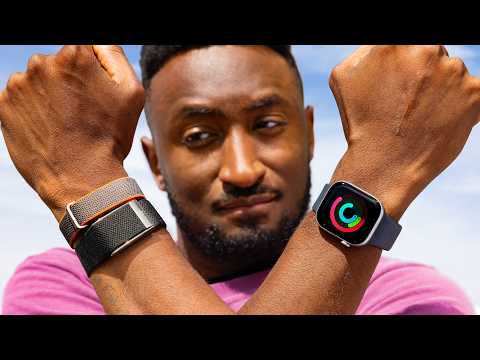
“You see, you don’t just buy the WHOOP tracker. You buy the tracker and then pay a membership subscription that starts at $200 a year and goes up to $350 a year forever. If you ever do stop paying, the WHOOP literally doesn’t do anything anymore. It becomes a brick. It’s useless.” — Marques Brownlee, 0:31
Clip command
yt-dlp --download-sections "*0:31-0:59" "https://www.youtube.com/watch?v=9GSDvO0LFFE" --force-keyframes-at-cuts --merge-output-format mp4 -o "whoop-brick.mp4"”There’s literally Whoop underwear”
“Hell, they sell Whoop-branded clothing where you can slip in the sensor and it still captures data as you’re wearing it. There’s literally Whoop underwear.” — Marques Brownlee, 3:26
Clip command
yt-dlp --download-sections "*3:15-3:47" "https://www.youtube.com/watch?v=9GSDvO0LFFE" --force-keyframes-at-cuts --merge-output-format mp4 -o "whoop-underwear.mp4"”Borderline predatory subscription model that we all universally hate”
“The Whoop is the super dense ‘I really care’ version for people who are tracking every little thing and trying to optimize their recovery, and a lot of them, I would guess, are probably training for something they want to maximize their performance in, all bundled into a borderline predatory subscription model that we all universally hate.” — Marques Brownlee, 15:27
Clip command
yt-dlp --download-sections "*15:27-16:01" "https://www.youtube.com/watch?v=9GSDvO0LFFE" --force-keyframes-at-cuts --merge-output-format mp4 -o "whoop-predatory-sub.mp4"”Because it’s Google”
“But with the subscription, it is a Whoop alternative from Google. And we know Google. This is a company that famously wants all of your data because they’re literally a data and ads company, and the more they know about people, the more money they can make. So of course it’s Google that’s willing to buy Fitbit and then sell a subsidized fitness tracker to get it in as many people’s hands as possible, to get as much data from those people as they possibly can.” — Marques Brownlee, 16:21
Clip command
yt-dlp --download-sections "*16:21-16:54" "https://www.youtube.com/watch?v=9GSDvO0LFFE" --force-keyframes-at-cuts --merge-output-format mp4 -o "whoop-its-google.mp4"”Hilarious calorie difference”
“Now here’s the data from a HIIT workout, tempo runs. Again, from the Apple Watch, then from the Whoop and finally from the Oura Ring. Nearly a 45% difference here in calories burned between the Whoop and the other two, which is crazy.” — Marques Brownlee, 10:10
Clip command
yt-dlp --download-sections "*10:10-10:46" "https://www.youtube.com/watch?v=9GSDvO0LFFE" --force-keyframes-at-cuts --merge-output-format mp4 -o "whoop-calorie-diff.mp4"Key Points
- Whoop dominates pro athletes (0:00) - Brownlee plays Ultimate Frisbee at club/pro level; many teammates wear Whoop
- Whoop is a brick without subscription (0:31) - $200-$350/year forever; stops working if you cancel
- Fitbit Air has no required subscription (0:52) - $99 device, optional $100/year for AI coach and full library
- The two-week test (1:08) - Wore Whoop, Fitbit Air, and Apple Watch simultaneously for practices, games, workouts, sleep
- Fitbit Air form factor wins (2:38) - Slimmer oval shape, thinner band, easier-to-swap velcro
- Whoop accessory ecosystem (3:15) - Wristbands, bicep straps, chest straps, branded clothing, even underwear
- Steph Curry special edition band (3:54) - Knitted Performance Loop reminiscent of Apple Watch Trail Loop; gets a permanent stain
- AI coach surprises him (6:00) - Sources its claims, defaults to sustainability, didn’t falter on tricky weight-loss questions
- He has a human trainer (6:58) - Programs his workouts year-round; AI coach is positioned as access for people without one
- Whoop is more feature-dense (7:34) - Live heart rate graph, stress monitor, journal, advanced labs blood biomarkers
- Calibration periods vary (9:08) - Whoop takes 30 days to fully calibrate; Oura needs 7 days; Apple Watch has none
- Apple Watch overcounts calories (11:22) - Across every workout in the test
- Oura ~ Whoop on heart rate (11:22) - Oura Ring 4 tracks closely with Whoop on HR data
- Strain vs cardio load (11:49) - Whoop’s 0-21 strain score vs Fitbit’s uncapped cardio load metric
- Whoop has longer battery (12:56) - 7-8 days vs Fitbit’s 5-6 days in real use
- Whoop’s wireless charging puck (13:31) - Slides onto rails so you never take the tracker off your wrist
- The slider model (15:05) - Apple Watch = beginner, Fitbit = medium, Whoop = advanced
- “It is a Whoop killer for…” (16:07) - Killer for basics buyers; Google-flavored alternative for subscribers
- He hasn’t decided (17:16) - Wants wrist notifications AND the data; subscribe to find out
Mentions
Companies
- Whoop (0:00) - The incumbent; dominant in pro athletes
- Google (2:19) - Owns Fitbit, runs Google Health app; repeatedly framed as a “data and ads company”
- Fitbit (0:21) - The brand name kept for product, dropped from app
- Apple (1:08) - Apple Watch as baseline tracker; Apple Health integration
- Oura (9:00) - Oura Ring 4 as third comparison point
- Garmin (14:24) - Mentioned as a more specialized tracker Fitbit defers to for runs
- 8-Sleep (14:24) - Sleep tracking platform Fitbit defers to
Products & Technologies
- Fitbit Air (0:21) - $99 tracker, the alleged “Whoop killer”
- Whoop 4.0 (0:00) - The reigning subscription tracker
- Whoop 5.0 (referenced in title/tags) - Implied next-gen comparison target
- Apple Watch Series 10 (9:53) - Baseline tracker in the multi-week test
- Oura Ring 4 (9:53) - Third comparison point in the workout tests
- Google Health app (5:26) - Renamed from the Fitbit app; backend for the Air
- Google Health Premium (2:09) - $100/year subscription; promo 3 free months
- Performance Loop band (3:47) - Knitted fabric band (Steph Curry edition)
- Active band (3:47) - Rubber band; better for sweat
- Elevated Modern band (3:47) - Best for dress-up use
- Whoop advanced labs (8:11) - Upload blood test results, track biomarkers over time
- Whoop strain (0-21) (12:00) - Personalized daily exertion score
- Fitbit cardio load (12:00) - Uncapped daily exertion metric
- AI fitness coach (6:00) - Google’s coach in the Fitbit Air app
People
- Steph Curry (3:54) - Special edition Performance Loop band collaborator
- Dr. Mike (6:31) - Referenced for sustainability-focused weight loss messaging
Surprising Quotes
“I hated being that guy wearing multiple trackers at the same time, but hey, someone’s gotta do it. And now I have your answer. And you might not like it, but I have your answer.” — Marques Brownlee, 1:22
“Turns out Whoop people are so obsessed with never taking this off and having 24/7 data that the idea of missing two hours of it just to charge is unacceptable. So you’ve got this little puck, you charge this with USB Type-C and then you slide this puck on the rails onto the Whoop, and then it’ll inductively charge the Whoop while you’re wearing them both. So now you’ve got this little wireless charger heating up on your wrist.” — Marques Brownlee, 13:31
“I just will, I’ll just keep charging them while I’m in the shower. I don’t wear them in the shower. Why do you have to? Anyway.” — Marques Brownlee, 14:04
“Also, the Fitbit can read from Apple Health right now, but it cannot write to Apple Health yet. Allegedly that’s coming with a software update. Allegedly.” — Marques Brownlee, 14:54
“The Apple Watch sort of accidentally became a fitness device after its primary task of showing you the time and the notifications from your phone.” — Marques Brownlee, 15:15
Transcript
Marques Brownlee: 0:00 All right, so WHOOP is dominant as a fitness tracker in the world of professional and enthusiast athletes all around the world.
Marques Brownlee: 0:10 I have a lot of friends. I play Ultimate Frisbee, friends and teammates who all wear WHOOPs. It’s this screenless, lightweight puck in a thin band with all these sensors on one side that you just wear 24/7.
Marques Brownlee: 0:21 So when the Fitbit Air came along, a lot of those same people immediately were interested and started asking me about it. Hey, is it… is it good? Should I… should I switch? Are they comparable?
Marques Brownlee: 0:31 And the main reason for that is the WHOOP subscription. You see, you don’t just buy the WHOOP tracker. You buy the tracker and then pay a membership subscription that starts at $200 a year and goes up to $350 a year forever.
Marques Brownlee: 0:45 If you ever do stop paying, the WHOOP literally doesn’t do anything anymore. It becomes a brick. It’s useless.
Marques Brownlee: 0:52 The Fitbit, on the other hand, doesn’t even require a subscription at all. And the subscription they do offer for extra features is much cheaper than the WHOOP. It’s $100 a year.
Marques Brownlee: 0:59 So almost everyone asking me about this basically just wants to know, is it as good as a WHOOP but cheaper? Because if so, then I might as well switch.
Marques Brownlee: 1:08 So, to any of my teammates out there watching this or any other athletes who are considering switching, I have spent the last almost two weeks wearing both of these things alongside an Apple Watch for a ton of stuff: practices, games, workouts, recoveries, sleeping, and more.
Marques Brownlee: 1:22 I hated being that guy wearing multiple trackers at the same time, but hey, someone’s gotta do it. And now I have your answer. And you might not like it, but I have your answer.
Marques Brownlee: 1:32 So to me, it’s pretty clear Fitbit Air is designed to take direct aim at WHOOP. Not just with the matching form factor, which I’ll get to in a second, but with their pricing model.
Marques Brownlee: 1:42 So like I said, the WHOOP is free, but it’s literally useless without the subscription. I honestly hope that changes after this, but as of right now, 200 bucks a year baseline every year to get in the door.
Marques Brownlee: 1:51 The $99 Fitbit Air is functional with no subscription at all, and it will do a good amount of basic tracking: heart rate, step tracking, calories burned, sleep tracking, and more.
Marques Brownlee: 2:02 But if you want the full suite of everything, including the AI fitness coach and a big workout library, that’s $100 a year.
Marques Brownlee: 2:09 And there’s all kinds of promos right now as it launches for like three free months of Google Health Premium, so I would say it definitely wins the price battle.
Marques Brownlee: 2:19 But also, keep in mind, this is still Google we’re talking about here, the data and ads company. So of course they would want to sell you a subsidized fitness tracker and leverage the Fitbit name to get it in as many hands as possible.
Marques Brownlee: 2:30 Because they want as much data as possible, because it’s Google. So just something to keep in mind, this is still a Google tracker.
Marques Brownlee: 2:38 So it may be a surprise, but I also give Google the nod in form factor over the WHOOP. They’re both pretty small, they’re both these little plastic pucks with an optical heart rate sensor, they’re both water-resistant.
Marques Brownlee: 2:47 But the Fitbit is a little bit more of this longer oval shape, and it’s just a little smaller, a little lighter than the WHOOP. And because it’s a narrow oval, it’s a little more obscure too. It has a thinner band on your wrist.
Marques Brownlee: 2:57 I also like the…
Marques Brownlee: 3:00 It’s velcro that you can easily adjust versus the Whoop clasp that is a little more secure but harder to adjust, uh, but that also means you can pretty easily just pop the tracker out. So the tracker you can take out of this band with a little pressure so you can switch bands super easily, which I really like.
Marques Brownlee: 3:15 I will say though, since the Whoop has existed for many more years than this Air, it has the advantage of a ton more accessories for it. So there’s the wristband, there’s also a bicep strap and a chest strap.
Marques Brownlee: 3:26 Hell, they sell Whoop-branded clothing where you can slip in the sensor and it still captures data as you’re wearing it. There’s literally Whoop underwear.
Marques Brownlee: 3:33 So these wristbands are the only accessories for the Fitbit Air right now, which for me is fine.
Marques Brownlee: 3:41 But I wouldn’t also be shocked if in like two weeks or like right after I publish this video there’s a bunch of accessories on Amazon or Temu or whatever. So yeah, right now just the bands.
Marques Brownlee: 3:47 So there are three wristband materials. There’s the Performance Loop band, then there’s the Active band and the Elevated Modern band.
Marques Brownlee: 3:54 I’ve spent most of my time with this, this is the Steph Curry special edition band, which is a version of the performance loop.
Marques Brownlee: 4:02 But it’s this knitted fabric that kind of reminds me of the Apple Watch trail loop, but I did notice I stained it somehow. Like at some point in my first two weeks, I have no idea when or how this happened, but there’s got a little stain in this fabric and that’s a real bummer because this is the comfortable band that I want to wear most of the day and sleep in.
Marques Brownlee: 4:14 I also worked out in it a few times. It is comfortable, it is secure, it was never an issue, but it does get a little damp if you sweat a lot in it.
Marques Brownlee: 4:21 Uh, so I would say that the rubber like Active band is probably more ideal for a lot of sweat.
Marques Brownlee: 4:29 If the whole point of these screenless fitness trackers is to be discrete and understated so you can wear an actual watch on the other wrist or something like that and dress it up, then these are all pretty good, but this Elevated Modern band is probably actually the best one.
Marques Brownlee: 4:39 So for those of you watching who don’t know, I would consider myself a pretty serious competitive athlete.
Marques Brownlee: 4:46 I made a video talking all about the other sports tech that I use, but to catch up anybody who’s missed it, I play Ultimate Frisbee and I play at a high level on on club and pro teams.
Marques Brownlee: 4:54 And so that involves a lot of practices and games, but then also a lot of workouts and cardio training and recovery and all that in between. And I track everything.
Marques Brownlee: 5:00 So for years I’ve done all this stuff wearing an Apple Watch. You can probably find tons of footage of me playing in games and see an Apple Watch on my wrist. So that’s been there for a long time. That’s my baseline.
Marques Brownlee: 5:09 But honestly, I would say I’m more of a free agent. I’m open-minded. I am very much willing to switch and become either a Whoop or Fitbit person if the data and the experience is that much better or more personalized for me.
Marques Brownlee: 5:16 So yeah, me wearing all three of these things for the past week and a half and doing all these activities was just as much an exercise in data collection as it was in my own personal interest.
Marques Brownlee: 5:26 So this new Fitbit Air plugs straight into the Google Health app, which was previously the Fitbit app.
Marques Brownlee: 5:37 Why they chose to get rid of the Fitbit name for the app but keep it for the product, I guess we’ll never know.
Marques Brownlee: 5:46 But the app is pretty good when you first jump in, you set this thing up, and if you’re paying the subscription you can…
Marques Brownlee: 6:00 Talk to the AI coach and tell it what you want to accomplish and what your goals are and it will build something up for you to start following from day one and literally from that point on every single day in the app there’s some new info looping in the sleep you had the night before and the weather that day if it’s going to be really hot or cold for your workout and just giving you suggestions on what to focus on.
Marques Brownlee: 6:20 And also at any point you can hit that blue button at the bottom and talk to the AI coach, ask it questions, and it gives you personalized answers based on what you were doing during the setup and all the data that it has about you and you can use it to keep updating your plan.
Marques Brownlee: 6:31 I even tried asking it a bunch of kind of tricky questions just to see if it would falter, but it generally didn’t. It gives sources when it’s like talking about other real world stuff and if you ask crazy questions about like how to lose massive amounts of weight or totally reshape your life, it brings the focus back to sustainability, which I mean that’s good. That’s the type of stuff I hear Dr. Mike talking about all the time in his videos when he’s talking with his patients. Drastic lifestyle changes aren’t a great idea, but you got to focus on what you can actually keep up. It’s good.
Marques Brownlee: 6:58 Uh, I also have a human personal trainer who is programming my workouts every day all year round. Like he knows my goals, he knows the schedule, the teams I play for and when I’m able to hit certain lifts and when I’m feeling good versus bad and can adjust programming accordingly. If I have a lingering injury, we can work around that. But not everyone has access to that, so the idea is you can have this AI trainer and just tell it everything about you and it can replicate that same experience and be just as personalized and responsive.
Marques Brownlee: 7:34 Now, the Whoop feature set I would say is a bit more advanced and comprehensive.
Marques Brownlee: 7:46 For example, here’s the display on the phone app during a workout from Google and from Whoop. Like the Fitbit UI is cleaner and prettier, no question, but Whoop is clustering way more information in here, the live graph of my heart rate, some of that stuff you might find useful.
Marques Brownlee: 7:59 Whoop also has a daily stress monitor, obviously a recovery score, uh there’s a built-in journal so you can identify patterns that might be leading to certain metric changes.
Marques Brownlee: 8:11 There’s even an advanced labs feature where you can literally upload lab blood test results and explore your different biomarkers and how they change over time. It’s a lot.
Marques Brownlee: 8:26 And yes, there’s also an AI assistant that you can talk to about your workouts and about your metrics. It’s not as prominent but it is just kind of lurking waiting all the time to help you out. It’s just a bunch more ways of interpreting the data coming off of the tracker.
Marques Brownlee: 8:43 So if the Apple Watch is like beginner mode of just getting started, it feels like the Fitbit is kind of like medium proficiency and then it does feel like the Whoop is made for someone more advanced. It’s like the more you use it, the more you know what you’re looking for, the more you can get out of it.
Marques Brownlee: 9:00 The Oura ring has basically a seven-day period where you wear it every day and then by the end of that week it knows you and then it can do everything.
Marques Brownlee: 9:02 But none of this matters if it’s not accurate, right?
Marques Brownlee: 9:07 One thing that’s important to note about these fitness trackers is they have a bit of a calibration period when you first get them. So the Apple Watch, which is not really personalized to you, doesn’t have one. It just sort of you set it up, you set your rings and you just start going and it does its best.
Marques Brownlee: 9:08 The Whoop is even a little more complicated. It takes different amounts of time to calibrate different features. Four days for your personalized recovery score, seven days for health monitor, 21 days for health span, and a whole 30 days until it’s fully calibrated for you.
Marques Brownlee: 9:23 But I did immediately start wearing all three of these at the same time as I go through my normal week of practices, workouts, recoveries and sleeps, just to see if the numbers were all the same.
Marques Brownlee: 9:33 And honestly, at the end of the day, we know that these aren’t like incredibly accurate, but it’s more just like as long as they’re consistent, right? Like if it’s a little high and then a little low and then a little high again, that’s not very useful. But if it’s a little bit high every single time, then okay, I can calibrate myself to that and that’s useful.
Marques Brownlee: 9:53 So here’s a zone 2 steady state indoor bike workout from the Apple Watch Series 10, the Whoop 4.0 and the Oura Ring 4. The watch doesn’t have any sort of scoring system like the other two, it’s just counting calories, but then they are all reading heart rates the entire time.
Marques Brownlee: 10:10 Now here’s the data from a HIIT workout, tempo runs. Again, from the Apple Watch, then from the Whoop and finally from the Oura Ring. Nearly a 45% difference here in calories burned between the Whoop and the other two, which is crazy.
Marques Brownlee: 10:23 And then here is a four-hour ultimate frisbee practice that I actually left up to automatic tracking for the Oura since I thought it’d be pretty obvious, but since it was still during the calibration period, it actually accidentally split it into two separate workouts, maybe because my heart rate was dropping in the middle with some rest that we took. So I combined the numbers and these are what those numbers are. Hilarious calorie difference between the watch and the Oura.
Marques Brownlee: 10:46 And so just in these workout summary pages, you can see the Apple Watch is the super simplistic version of this, right? It even includes miles because it has GPS where the fitness trackers don’t, but that’s not really necessary for most of my workouts. But yeah, I like how the Oura puts the summary from the AI right at the top instead of having to click into it like the Whoop. And then in these more heart rate sensitive workouts like the HIIT workout, you get a very clear idea of what your heart rate was and when. Honestly, the Oura is my favorite workout summary page among the three of these. It’s excellent.
Marques Brownlee: 11:22 So overall basically two things became clear with my little experiment here. One is that the Apple Watch clearly overcounts calories burned every time. That’s just the way it is. But then two is that the Oura Ring is pretty in line with the Whoop as far as heart rate numbers across the board and it’s just a little bit higher normally in total calories burned.
Marques Brownlee: 11:49 The real difference is just in how they choose to summarize and present that data for you. So like every Whoop user is used to looking at strain and recovery percentage. Uh, the Oura doesn’t have that. Instead it has cardio load. That’s just like the headline number.
Marques Brownlee: 12:00 So Whoop’s strain is on a scale from 0 to 21 and it’s personalized based on your history and your… Health. Fitbit’s cardio load, it doesn’t really seem to have a cap, but it’s basically measuring how elevated your heart rate gets from normal and for how long. So once the AI coach like gets to know you well enough, it knows what that normal is, and then it can set a goal for cardio load for each week. Funny, the first week it didn’t really know me very well, so it assigned the frisbee practice as like a 327 cardio load when my goal for the whole week was 150, but it figured itself out later.
Marques Brownlee: 12:27 But yeah, once you’re calibrated, just like Whoop’s strain, that is the glancable number that you can check out just to generally see how much work you’re doing.
Marques Brownlee: 12:37 So neither of these fitness trackers has a clock or a screen or any way of showing you notifications, but they both do have a haptic motor for an alarm clock. So you can set an alarm and this will buzz you on the wrist just by tapping you lightly. The Whoop’s is a little more rattly and the Fitbit’s feels a little more clean. Both can be dismissed by just double tapping. The more you know.
Marques Brownlee: 12:56 The Whoop does also have a bit of a longer battery life. So the Fitbit Luxe is rated for seven days. With my usage, I feel like it’s closer to five to six days. The Whoop is closer to seven or eight days.
Marques Brownlee: 13:14 But when it comes to charging them, so the Fitbit comes with this little three foot cable, USB-C on one side and little magnetic pins on the other. So you gotta take it off your wrist and you pop it on and this will charge pretty fast. Like zero to 100 in 90 minutes, but also five minutes of charge will get you about a day of usage if you just, you gotta workout to go do or you’re about to go somewhere you can just plug it in for five minutes.
Marques Brownlee: 13:31 The Whoop, on the other hand, has this little puck here. Turns out Whoop people are so obsessed with never taking this off and having 24/7 data that the idea of missing two hours of it just to charge is unacceptable. So you’ve got this little puck, you charge this with USB Type-C and then you slide this puck on the rails onto the Whoop, and then it’ll inductively charge the Whoop while you’re wearing them both. So now you’ve got this little wireless charger heating up on your wrist. It’s much slower, but you don’t have to take the Whoop off.
Marques Brownlee: 14:04 I just will, I’ll just keep charging them while I’m in the shower. I don’t wear them in the shower. Why do you have to? Anyway.
Marques Brownlee: 14:11 Both Whoop and Fitbit Luxe are multi-platform compatible, so that’s nice. You can pair them to an Android phone or an iPhone, whichever you have. Whoop also happens to have an iPad app though, which Google Health does not. It’s not a very good app, but it’s better than no app at all.
Marques Brownlee: 14:24 And then, if you have other trackers, like an 8-Sleep or a Garmin for example, Fitbit will actually defer to those more specialized fitness trackers for those certain activities for contributing to Google Health. So your sleep, if you have an 8-Sleep will take from the 8-Sleep instead of the Fitbit. And if you go for a run with the Garmin and it has GPS and all these better metrics, it will take that instead of whatever would come from the Fitbit. And then you can always view sources for whatever data you’re looking at when you’re in the Google Health app, which is nice. It’s the little things.
Marques Brownlee: 14:54 Also, the Fitbit can read from Apple Health right now, but it cannot write to Apple Health yet.
Marques Brownlee: 15:00 Allegedly that’s coming with a software update.
Marques Brownlee: 15:03 Allegedly.
Marques Brownlee: 15:05 Wearing all three of these has taught me that there is room for all three of them in the fitness world. There’s like a slider for beginner, medium, advanced.
Marques Brownlee: 15:15 The Apple Watch sort of accidentally became a fitness device after its primary task of showing you the time and the notifications from your phone. Wear it all day, close your rings, get some steps in, the end. Super simple.
Marques Brownlee: 15:27 The Whoop is the super dense ‘I really care’ version for people who are tracking every little thing and trying to optimize their recovery, and a lot of them, I would guess, are probably training for something they want to maximize their performance in, all bundled into a borderline predatory subscription model that we all universally hate.
Marques Brownlee: 15:49 So then here comes the Fitbit Luxe, aimed directly at the Whoop. It’s the same screenless form factor and it does 90% of what the Whoop does without any subscription, and you actually own the thing.
Marques Brownlee: 16:01 So the natural reaction is that this does feel like a Whoop killer. But I’ll add some nuance to it.
Marques Brownlee: 16:07 This is a Whoop killer for people who just want more of the basics of health tracking, fitness tracking: your heart rate, your sleep tracking, your step counter, your calories, your workouts, all that stuff, because that’s all included. You get that when you buy the thing and you own it.
Marques Brownlee: 16:21 But with the subscription, it is a Whoop alternative from Google. And we know Google. This is a company that famously wants all of your data because they’re literally a data and ads company, and the more they know about people, the more money they can make.
Marques Brownlee: 16:38 So of course it’s Google that’s willing to buy Fitbit and then sell a subsidized fitness tracker to get it in as many people’s hands as possible, to get as much data from those people as they possibly can.
Marques Brownlee: 16:52 Just something to keep in mind because it’s Google.
Marques Brownlee: 16:54 So I think people getting the most out of Whoop and all of its personalization are going to continue using Whoop.
Marques Brownlee: 17:04 And also for people who are just getting started, I think you can just use something that’s cheap. That’s why you should probably just go with the one built into your smartwatch. It’s easy.
Marques Brownlee: 17:13 And then for everyone else, there’s Fitbit.
Marques Brownlee: 17:16 Me personally, I, you know, I’ve gone through this experiment, I’ve worn them all. I haven’t actually really made up my mind yet on which one I want to be. I kind of, I want having notifications on my wrist, but I also want the extra data.
Marques Brownlee: 17:30 So we’ll see. Get subscribed to see which one stays on my wrist longer in future videos and that’s how you’ll know which one I picked.
Marques Brownlee: 17:41 Thanks for watching. Get you guys in the next one. Peace.